The Glossary System is one of the most powerful productivity tools within MLS 2026. It allows service personnel to quickly add:
•labor operations
•parts groups
•repetitive maintenance packages
to workorders using simple codes and organized lookup structures.
The system was designed to:
•improve consistency
•reduce typing
•speed workorder creation
•simplify training
•improve service descriptions
•standardize pricing and procedures
for the entire business.
Because:
👉 Workorders are the core of MLS 2026
the Glossary System integrates directly into daily operations.
Workorders: The Center Of MLS 2026
Nearly all operational activity within MLS 2026 begins with:
👉 the Workorder.
A workorder may begin as:
•an Estimate
and later be converted into:
•a final Invoice
for customer billing.
Throughout the workorder process, the system allows:
•labor descriptions
•parts
•recommendations
•inspections
•accounting
•payroll activity
•inventory movement
•customer history
to all integrate together automatically.
The Glossary System exists primarily to:
👉 simplify and standardize workorder creation.
Three Main Components Of The Glossary System
The Glossary System contains three primary sections:
1.Labor Glossary
2.Parts Pick Lists
3.Kits
Together, these sections allow both experienced and inexperienced service writers to build highly detailed workorders quickly and consistently.
Labor Glossary
The:
👉 Labor Glossary
uses a structured coding system designed to organize labor operations logically and efficiently.
The system is divided into:
•Systems
•Groups
•Labor Descriptions
This layered structure allows users to quickly drill down to the proper service operation.
Systems
Systems represent:
👉 the major service categories
for the product being serviced.
Examples in automotive repair might include:
•Brakes
•Electrical
•Cooling
•Engine
•Steering
•Suspension
•Drive Train
These become the highest level of organization.
Groups
Each System contains:
👉 Groups
which further divide services into more specific categories.
Examples under:
👉 Brakes
might include:
•Front Disc Brakes
•Rear Disc Brakes
•Rear Drum Brakes
•Master Cylinder
•ABS Components
This narrows the search area significantly.
Labor Descriptions
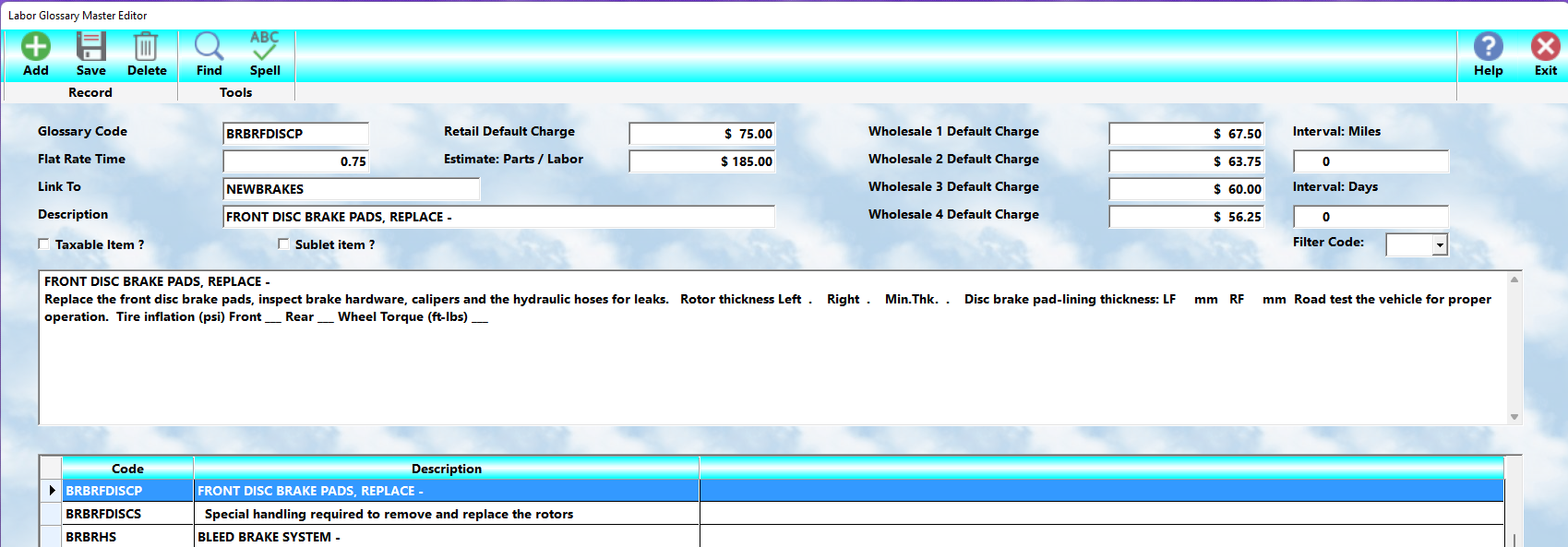
Within each Group are the:
👉 actual labor glossary descriptions
used on workorders.
These contain:
•detailed service descriptions
•labor times
•labor charges
•operation information
Once selected:
👉 the labor item is added directly to the workorder.
The service writer may then:
•edit
•modify
•customize
the description specifically for the customer and repair situation.
⚠️ The final edited version becomes the permanent workorder record.
Why The Labor Glossary Is So Valuable
The Labor Glossary allows:
•fast workorder creation
•consistent service descriptions
•easier employee training
•improved customer communication
•standardized operations
Even inexperienced service writers can quickly locate the proper service operation using:
👉 the built-in lookup system.
Planning Your Glossary Structure
Before building glossary records:
👉 it is strongly recommended that management create an organizational plan.
A good structure:
•improves lookup speed
•simplifies training
•prevents duplicate entries
•standardizes terminology
The recommended structure is:
👉 System
→ Group
→ Service Description
This organization mirrors the way technicians and service advisors naturally think about repairs.
Parts Pick Lists
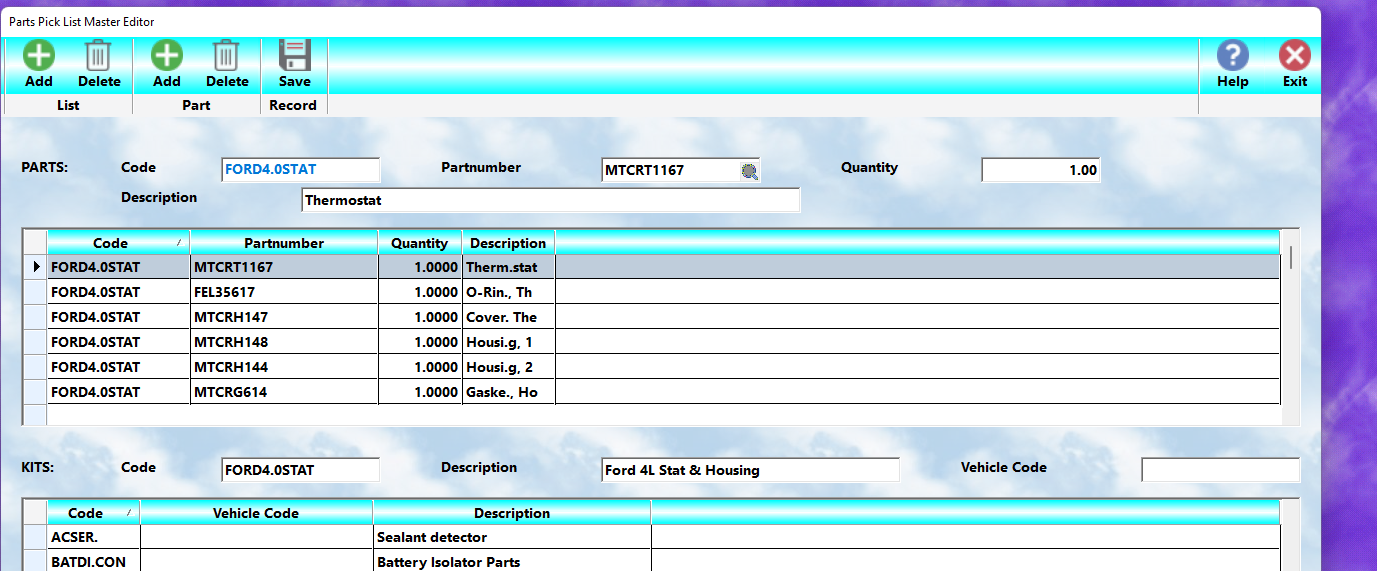
The:
👉 Parts Pick List
system allows multiple inventory parts to be added to a workorder using:
👉 a single code.
This is extremely useful for:
•repetitive repairs
•maintenance services
•standard repair packages
•commonly grouped inventory items
How Pick Lists Work
A Pick List contains:
•multiple inventory part numbers
grouped together under:
👉 one Pick List code.
When the code is entered:
👉 ALL associated parts are automatically added to the workorder.
This eliminates:
•repetitive manual entry
•missed parts
•inconsistent service packages
Examples Of Pick List Usage
Examples might include:
•oil service kits
•brake hardware packages
•tune-up components
•gasket sets
•filter groups
•fluid service items
A service writer simply enters:
👉 the Pick List code
and all required parts appear automatically.
Kits
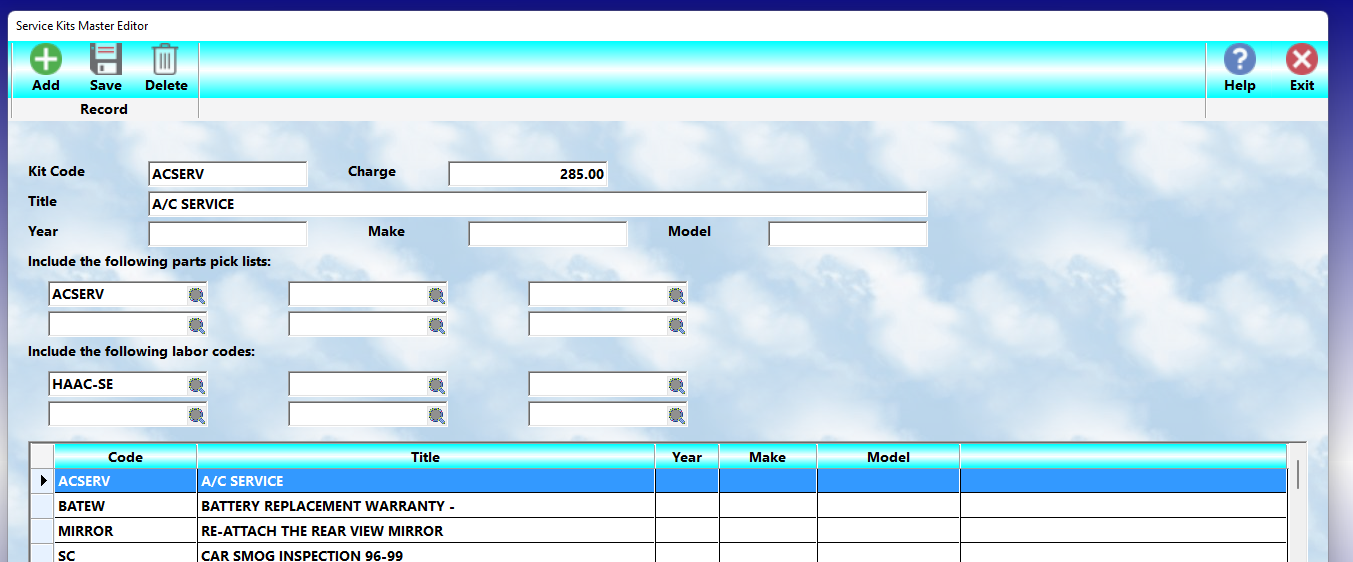
The:
👉 Kit System
combines:
•Parts Pick Lists
and
•Labor Glossary operations
into:
👉 one master service package.
Kits are particularly valuable for:
•scheduled maintenance
•repetitive service packages
•fleet service
•package pricing
•standard repair procedures
Kit Structure
A single Kit may include:
•up to 6 Parts Pick Lists
and
•up to 6 Labor Glossary codes
under:
👉 one Kit code.
Entering the Kit code automatically adds:
•all parts
•all labor descriptions
to the workorder instantly.
Examples Of Kits
Typical Kit examples might include:
•30,000 mile service
•timing belt package
•brake overhaul
•cooling system service
•fleet maintenance packages
This allows very complex workorders to be created in seconds.
Benefits Of Kits
Kits help:
•reduce service writer workload
•improve consistency
•standardize maintenance services
•simplify training
•improve sales opportunities
•reduce missed labor or parts
They are one of the most efficient tools within MLS 2026.
Glossary History Chart
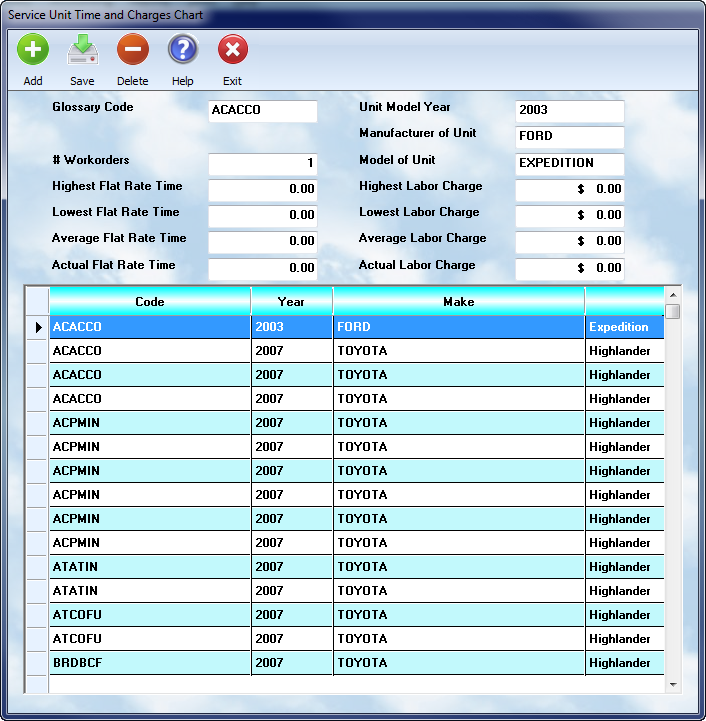
MLS 2026 automatically maintains:
👉 a Glossary History Chart
for labor glossary operations performed through completed workorders.
The Chart system tracks:
•actual labor charges
•flat-rate labor times
•service frequency
•vehicle-specific history
based on:
•labor glossary code
•vehicle year
•manufacturer
•model
This creates a powerful historical reference system built directly from your actual shop activity.
Why The Chart Is Valuable
When preparing a workorder:
👉 management can review:
•prior labor charges
•average pricing
•historical labor times
•vehicle-specific service history
for the same type of service previously performed.
The Chart system automatically tracks:
•highest charges
•lowest charges
•average charges
•highest labor times
•lowest labor times
•average labor times
for matching services.
This helps management:
•improve estimate accuracy
•maintain pricing consistency
•analyze labor performance
•refine flat-rate standards
•improve profitability control
throughout the business.
Automatic Chart Updates
The Glossary Chart is:
👉 automatically updated
during:
👉 Daily Closing.
If a matching service record does not already exist:
👉 MLS 2026 automatically creates a new chart entry.
This process requires:
•no manual entry
•no additional operator work
during normal operations.
Rebuilding Charts
The Chart database may be completely rebuilt from:
👉 Glossary → Rebuild
on the main menu.
The rebuild process recalculates chart totals using:
•historical workorder information
•labor glossary activity
•service records
beginning from a selected date range.
Because older pricing data may no longer be relevant:
👉 many businesses periodically rebuild charts
using:
•more recent starting dates
to maintain more current:
•labor averages
•pricing analysis
•service statistics
⚠️ Rebuilding charts can process very large amounts of data and should normally be run:
•overnight
or
•when the system is not actively in use.
Editing Charts
Chart entries may be:
•reviewed
•edited
•maintained
from:
👉 Glossary → Charts
Management may manually adjust:
•actual labor charges
•flat-rate times
•service references
for specific vehicle and service combinations.
This provides flexibility for:
•refining labor standards
•standardizing pricing
•correcting historical values
•improving estimate consistency
throughout the MLS 2026 workorder system.
Why The Glossary System Is Important
The Glossary System is one of the key workflow acceleration tools within MLS 2026.
It allows:
•rapid workorder creation
•operational consistency
•simplified employee training
•improved customer communication
•standardized service procedures
while tightly integrating:
•inventory
•labor
•pricing
•accounting
•payroll
•reporting
through the workorder system.
Recommended Best Practices
When building Glossary records:
•Plan Systems and Groups carefully
•Use consistent naming conventions
•Avoid duplicate labor descriptions
•Standardize repetitive services
•Build Pick Lists for common repairs
•Use Kits for maintenance packages
•Review historical labor charts regularly
•Update descriptions as procedures evolve
Recommended Companion Sections
This section works closely with:
•Workorders
•Estimates and Invoices
•Inventory Control
•Labor Pricing
•Payroll Labor Tracking
•Time Clock Integration
•Reporting Systems
•Service Recommendations
Together, these sections provide a complete workorder generation and operational workflow system within MLS 2026.
Kits are particularly helpful when handling repetitive maintenance services for vehicles commonly serviced by your business. A kit can have up to six different parts pick lists ( each with multiple parts ) and up to six different labor glossaries ( descriptions ) added to a workorder with a single kit code. Often kits are used when providing periodic maintenance services, ie. a 30,000 mile service.
Your system will maintain a labor chart (history ) for each unique glossary code for vehicles based on year, make, and model. The chart can be rebuilt, or edited, from the Glossary - Chart menu selection. When performing a vehicle service, after entering the glossary code, you can do a lookup on the charge, based on the chart, and see the high, low, and average time and charges you have assessed for that service specific to that vehicle type.