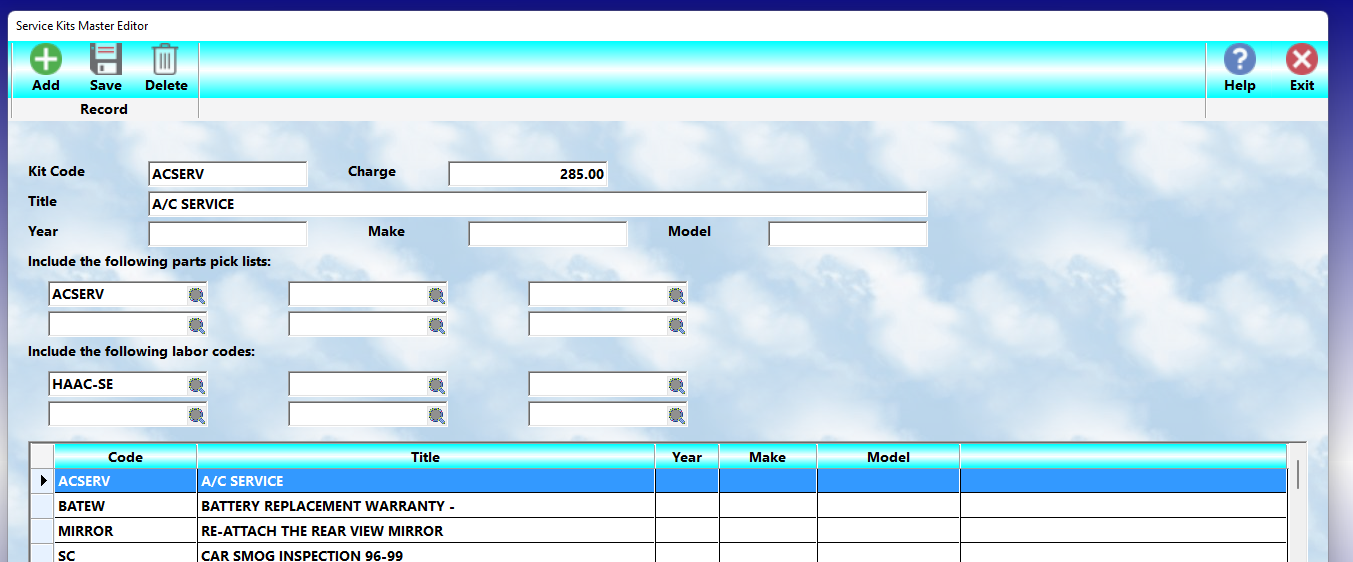
Kits (MLS 2026)
Kits provide one of the fastest methods available for building complete workorders within MLS 2026.
A:
👉 Kit
allows the operator to add:
•multiple Parts Pick Lists
and
•multiple Labor Glossaries
to a workorder using:
👉 a single Kit code.
Once configured, Kits automatically load all associated:
•parts
•labor descriptions
•service operations
onto the workorder with virtually no additional operator input.
This dramatically speeds:
•estimate preparation
•invoice creation
•repetitive maintenance services
•standardized repair packages
throughout the business.
Why Kits Are Important
Many businesses repeatedly perform:
•scheduled maintenance
•common repair procedures
•fleet services
•inspection packages
•factory service intervals
Without Kits:
👉 service writers must repeatedly:
•enter parts
•select labor operations
•build workorders manually
for the same services over and over again.
Kits automate this entire process.
What A Kit Can Contain
A single Kit may contain:
•up to 6 Parts Pick Lists
and
•up to 6 Labor Glossary codes
This allows:
👉 extremely complex service packages
to be created in seconds.
Depending on the Pick Lists used, one Kit may automatically insert:
•hundreds of parts
•extensive labor descriptions
•complete maintenance procedures
into the workorder.
Typical Uses For Kits
Kits are especially valuable for:
•factory maintenance schedules
•mileage services
•seasonal inspections
•brake packages
•cooling system services
•fleet maintenance
•recurring service programs
Examples:
•30,000 Mile Service
•60,000 Mile Service
•Complete Brake Service
•Transmission Service Package
•Pre-Sale Inspection Package
How Kits Work
When the Kit code is entered on a workorder:
👉 MLS 2026 automatically:
•loads the specified Pick Lists
•inserts all associated parts
•loads the designated Labor Glossaries
•inserts all labor descriptions
directly into the workorder.
This creates:
•consistent service packages
•faster workflow
•reduced typing
•fewer missed operations
Kit Setup
Kits are configured from the:
👉 Glossary → Kits
section.
Kit Code
The:
👉 Kit Code
is created using the same general coding principles used throughout the Glossary system.
Codes should be:
•logical
•descriptive
•easy to remember
This simplifies:
•lookup
•training
•service writer workflow
Kit Charge
The:
👉 Charge
field allows the business to specify:
👉 one total service price
for the entire Kit.
If A Charge IS Entered
If a Kit Charge is specified:
👉 the customer sees:
•one labor line
•one total service price
The individual:
•parts charges
•labor charges
within the Kit are marked:
👉 N/A
This is especially useful for:
•menu pricing
•package maintenance
•promotional services
•flat-rate maintenance programs
where:
👉 one fixed price
is desired regardless of the individual components used.
If No Charge Is Entered
If the Charge field is left blank:
👉 all labor and parts are priced individually
using their:
•normal inventory pricing
•glossary labor pricing
This allows:
•full itemization
•detailed estimates
•flexible billing
on the workorder.
Kit Title
The:
👉 Kit Title
is a:
👉 one-line summary description
of the service package.
This title should clearly identify:
•the type of service
•the intended application
•the product or vehicle covered
Example:
Mustang 30,000 Mile Factory Service
The title should:
•summarize the package
but
•NOT attempt to provide detailed repair descriptions
since the labor glossaries already contain those details.
Parts Pick Lists In Kits
Each Kit may reference:
👉 up to 6 Parts Pick Lists.
⚠️ These MUST be:
👉 valid Pick Lists already existing in the system.
If the referenced Pick Lists do not exist:
👉 the parts cannot be loaded onto the workorder.
Important Pick List Entry Rule
When manually entering Pick Lists on workorders:
👉 the code normally uses:
(pound symbol)
However:
⚠️ DO NOT include the # symbol inside the Kit setup.
Only:
👉 the actual Pick List code
should be entered in the Kit configuration.
Labor Glossaries In Kits
Each Kit may also reference:
👉 up to 6 Labor Glossary codes.
These must also:
👉 already exist in the system.
The Labor Glossaries provide:
•detailed service descriptions
•labor operations
•recommendations
•pricing information
that are automatically added to the workorder.
Important Linking Rule
⚠️ Labor Glossary linking does NOT occur inside Kits.
This is very important.
When a Kit is processed:
👉 MLS 2026 loads ONLY the specific Labor Glossary codes listed in the Kit.
If a glossary normally:
•links additional glossaries
those linked items are:
⚠️ NOT automatically inserted through the Kit.
Therefore:
👉 ALL required labor operations
must be explicitly listed within the Kit setup itself.
Why This Matters
If a required Labor Glossary is omitted from the Kit:
👉 it will NOT appear on the workorder.
This can result in:
•incomplete services
•missing labor descriptions
•inaccurate estimates
•billing omissions
Careful Kit design is therefore extremely important.
Benefits Of Kits
Kits provide major advantages:
•Faster workorder creation
•Standardized service packages
•Reduced operator typing
•Improved estimate consistency
•Fewer missed parts or labor items
•Simplified employee training
•Faster repetitive service processing
•More professional invoices and estimates
They are particularly valuable in:
•high-volume service environments
•fleet maintenance
•preventive maintenance programs
•standardized repair operations
Recommended Best Practices
When building Kits:
•Use logical Kit codes
•Use clear Kit titles
•Verify all Pick Lists exist
•Verify all Labor Glossaries exist
•Include ALL required labor operations
•Test Kits before production use
•Review Kits periodically for accuracy
•Standardize repetitive services whenever possible
Recommended Companion Sections
This section works closely with:
•Glossary Concepts & Coding Structure
•Parts Pick Lists
•Labor Glossaries
•Workorders
•Estimates and Invoices
•Inventory Control
•Service Recommendations
Together, these sections provide a complete automated service package and workorder generation workflow within MLS 2026.
[TEditFormControlObj]