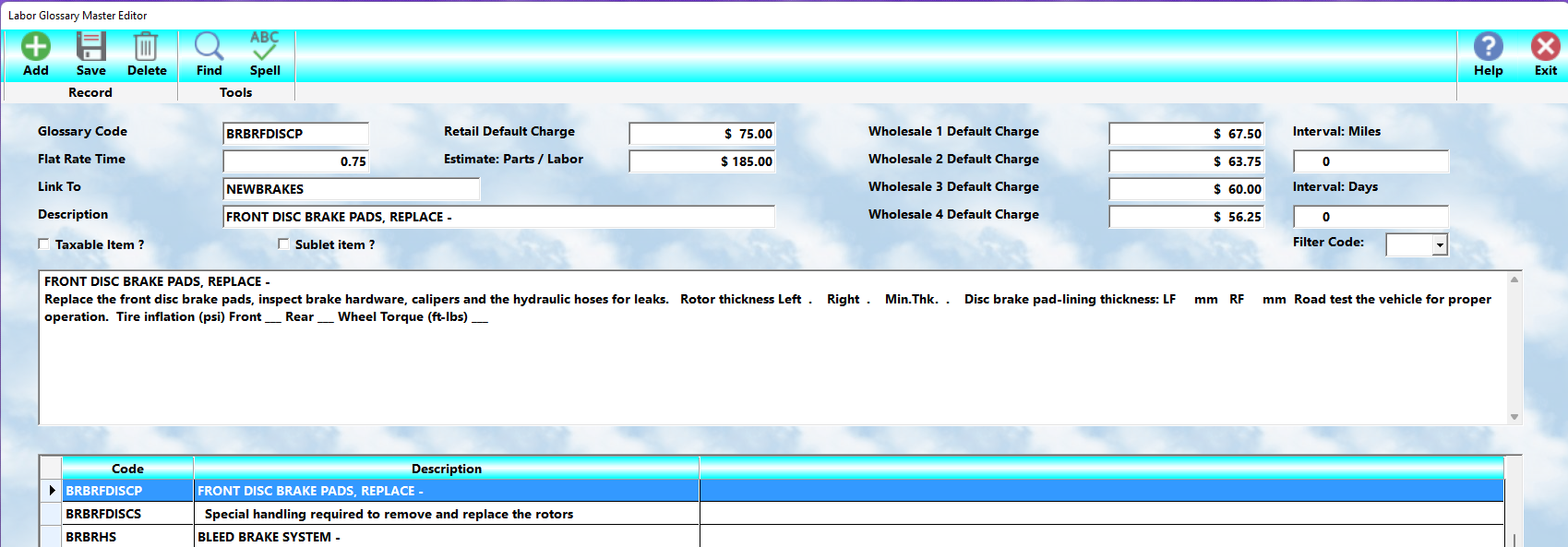
The:
👉 Labor Glossary System
is used to add:
•labor operations
•service descriptions
•recommendations
•inspection details
directly onto workorders using:
👉 simple glossary codes.
This is one of the most powerful and time-saving features within MLS 2026 because it allows service personnel to create:
•detailed
•accurate
•professional
workorders with only a few keystrokes.
Labor Glossaries greatly improve:
•workorder speed
•consistency
•communication
•employee training
•customer confidence
throughout the entire service writing process.
Purpose Of Labor Glossaries
A Labor Glossary allows:
👉 complete service descriptions
to be stored under:
👉 a simple code.
Instead of repeatedly typing lengthy repair explanations, the operator simply:
•enters the glossary code
or
•performs a lookup
and the complete description is inserted automatically into the workorder.
The inserted text may then be:
•edited
•expanded
•customized
for the specific repair situation.
Description Capacity
Each Labor Glossary may contain:
👉 up to 30 lines of text.
Each line supports:
👉 60 characters
for a total capacity of approximately:
👉 1800 characters.
This provides enough space for:
•detailed repair explanations
•inspection notes
•recommendations
•procedural details
•maintenance descriptions
while still allowing very fast workorder generation.
The Editing Window
The editing window displays:
👉 five lines at a time
but may be:
•scrolled
•expanded
•edited
throughout the full 30-line description area.
The editor uses:
👉 automatic word wrap
to move words to the next line when necessary.
This simplifies text entry and helps maintain:
•clean formatting
•professional appearance
•readable descriptions
Recommended Writing Style
For best presentation:
👉 it is strongly recommended that:
•the service title appear on the first line
•the first line be entered in ALL CAPITAL LETTERS
This creates:
•a professional appearance
•better readability
•clearer workorder structure
Detailed Service Formatting
Additional lines should normally use:
•upper and lower case text
to describe:
•work performed
•procedures completed
•inspections made
•recommendations provided
Many businesses format services using:
👉 dash-style activity lists
such as:
•Removed worn brake pads
•Resurfaced front rotors
•Cleaned and lubricated caliper slides
•Road tested vehicle
This creates very professional-looking invoices and estimates.
Avoiding Abbreviations
⚠️ Abbreviations are strongly discouraged.
The goal of the Labor Glossary system is:
👉 clear customer communication.
Abbreviations may:
•confuse customers
•create misunderstandings
•reduce professionalism
•contribute to disputes
Clear, complete descriptions:
•improve customer confidence
•reduce confusion
•provide better legal protection
for the business.
Full Screen Editing
Selecting:
👉 Edit
opens the complete description in a popup editor.
This makes:
•reviewing
•formatting
•revising
•proofreading
much easier.
Voice Dictation Support
MLS 2026 also supports:
👉 voice dictation
within the editor.
Selecting the:
👉 microphone button
allows operators to:
•dictate descriptions verbally
•speed text entry
•simplify detailed explanations
This is especially useful for:
•long repair descriptions
•inspection results
•recommendation notes
AI-Assisted Editing
If an AI account is configured:
👉 the AI button
can assist with:
•spelling correction
•grammar review
•professional wording
•clarity improvement
The operator may:
•accept the revised text
•continue editing manually
•save the improved version
or
•exit without changing the original text
⚠️ The AI tools improve communication clarity only.
They do NOT alter:
•pricing
•labor units
•accounting data
•operational information
Labor Glossary Data Fields
Once the description is complete:
👉 the operational data fields may be configured.
These fields control:
•pricing
•labor calculations
•taxability
•workorder behavior
Code
The:
👉 Code
is the shortcut entry value used to locate and insert the glossary item.
Codes should be:
•logical
•organized
•easy to remember
following the coding structure discussed in:
👉 Glossary Concepts & Coding Structure.
Summary Description
The:
👉 Description Line
is the short summary displayed:
•on lookup screens
•workorder summary screens
•labor review displays
This line helps users quickly identify the operation.
⚠️ This summary does NOT print on the final workorder or invoice.
Estimate Charge
The:
👉 Estimate Charge
represents:
•the anticipated customer price
•estimated package pricing
•combined service estimates
This is often used for:
•diagnostics
•packaged services
•bundled pricing
•estimates including labor and parts
Labor Charge
The:
👉 Labor Charge
is the amount charged to the customer for the service.
Two calculation methods are supported.
Fixed Price Method
If a Labor Charge is entered:
👉 that amount is used directly.
No additional labor-rate calculation occurs.
This is useful for:
•fixed-price services
•menu pricing
•packaged maintenance
Unit-Based Calculation
If no Labor Charge is entered:
👉 MLS 2026 automatically calculates the charge
by multiplying:
👉 Labor Units × Shop Rate.
This provides flexible labor pricing based on:
•service time
•labor rates
•pricing structures
Multiple Pricing Levels
Each Labor Glossary supports:
👉 five pricing levels
corresponding to:
•Retail
•Wholesale Level 1
•Wholesale Level 2
•Wholesale Level 3
•Wholesale Level 4
This allows flexible pricing structures for:
•retail customers
•fleet accounts
•warranty companies
•wholesale clients
Labor Units
The:
👉 Labor Units
field stores:
•estimated service time
•flat-rate hours
•labor standards
Examples:
•1.5
•2.0
•4.8
These units:
•assist pricing
•support payroll calculations
•aid productivity tracking
⚠️ Labor Units are stored internally but are NOT printed for the customer.
Taxable Labor
If labor is taxable:
👉 check the Taxable option.
This serves as:
👉 the default setting
when the labor is added to the workorder.
The setting may still be modified during:
•workorder editing
•invoice preparation
if necessary.
Linked Labor Codes
MLS 2026 supports:
👉 linked labor glossary codes.
This allows:
👉 one labor operation
to automatically insert:
👉 additional labor operations.
This process is known as:
👉 Linking.
Why Linking Is Valuable
Linking is extremely useful for:
•maintenance packages
•repetitive service procedures
•inspection programs
•standardized repair sequences
For example:
👉 a major maintenance service
might automatically insert:
•oil service
•lubrication
•safety inspection
•spark plug replacement
•fluid inspection
through linked labor codes.
Example Of Linked Services
A:
👉 60,000 Mile Service
might include:
•major inspection
•tune-up
•oil service
•safety check
•fluid replacement
Each linked code can call:
👉 additional glossary entries
automatically.
This creates:
•extremely fast workorder generation
•consistent maintenance procedures
•standardized customer communication
Benefits Of Labor Glossaries
Labor Glossaries help:
•reduce typing
•improve consistency
•standardize operations
•simplify employee training
•improve professionalism
•improve customer understanding
•accelerate workorder generation
They are one of the core workflow tools within MLS 2026.
Recommended Best Practices
When building Labor Glossaries:
•Use clear, professional descriptions
•Avoid abbreviations
•Use consistent formatting
•Organize codes logically
•Use ALL CAPS for service titles
•Standardize repetitive procedures
•Use linked codes for maintenance packages
•Review and update descriptions regularly
Recommended Companion Sections
This section works closely with:
•Glossary Concepts & Coding Structure
•Parts Pick Lists
•Kits
•Workorders
•Estimates and Invoices
•Labor Pricing
•Payroll Labor Tracking
•Service Recommendations
Together, these sections provide a complete labor automation and workorder generation workflow within MLS 2026.