MLS 2026 includes integrated support for outgoing SMS text messaging using the Twilio messaging platform.
Text messaging has become one of the fastest and most effective methods of communication with clients, especially for:
•Appointment reminders
•Status updates
•Approval requests
•Pickup notifications
•Brief service communications
The MLS 2026 integration is designed specifically for:
•Outgoing text messaging
•Quick customer communication
•Automated reminder notifications
At this time, the integration is intended primarily for outbound messaging.
Why Use Text Messaging?
Text messaging allows your shop to:
•Communicate quickly
•Reduce missed appointments
•Improve customer responsiveness
•Keep clients informed without interrupting them
Unlike phone calls:
•Clients can review texts when convenient
•Messages are less intrusive
•Communication is often faster and more effective
This is especially valuable when:
•Waiting for approvals
•Delayed by parts availability
•Notifying customers their vehicle is ready
•Sending appointment reminders
Recommended Text Messaging Practices
MLS 2026 strongly recommends the following guidelines when using SMS communications:
•Keep messages brief
•Use simple, professional language
•Encourage customers to call with questions
•Avoid excessive messaging
•Do not use text messaging for aggressive advertising
Text messaging is most effective for:
•Status updates
•Appointment reminders
•Quick notifications
•Follow-up communication
Customers generally appreciate concise, respectful communication that values their time.
Twilio Integration
MLS 2026 integrates directly with the Twilio SMS platform.
Twilio provides:
•Reliable message delivery
•Business-class SMS services
•Stable long-term infrastructure
•Extensive messaging support
The MLS 2026 integration handles all programming internally.
No custom programming is required by the shop.
Twilio Account Setup
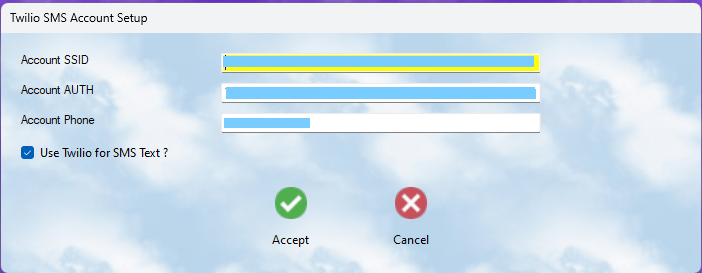
To use SMS messaging:
1.Create a Twilio account
2.Obtain:
oAccount SID
oAuthorization Token
oAssigned phone number
Once your account is active:
Go to:
Tools → 3rd Party Setup → Twilio
You will then enter:
•Account SID
•AUTH Token
•Twilio Phone Number
Check:
•Use Twilio
Then press:
•Accept
At that point, SMS messaging becomes active within MLS 2026.
Appointment Reminder Integration
MLS 2026 can automatically send:
•Appointment reminder texts
•Reminder emails
through the Appointment Scheduler.
Reminder messages are typically sent:
•The day before the appointment
This can significantly reduce:
•Missed appointments
•No-shows
•Scheduling confusion
Sending Text Messages
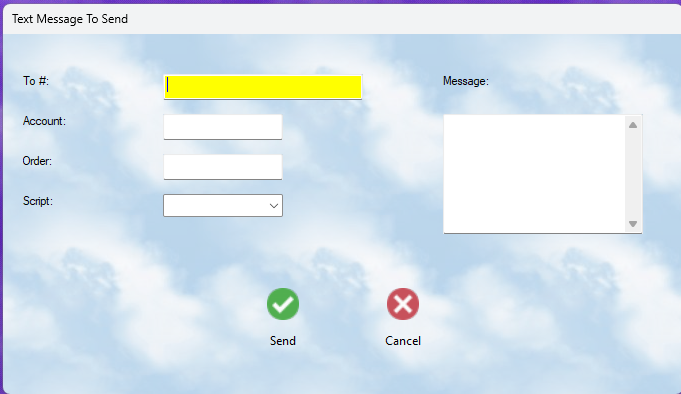
Whenever you see the Text Message button within MLS 2026, you may send an SMS message.
The system can automatically pull:
•Client cellular number
•Account information
•Workorder number
depending on the screen from which the message is sent.
Messages may be sent from:
•Workorders
•Client records
•Scheduler screens
•Main program menus
SMS Message Scripts
Many text messages are repetitive in nature.
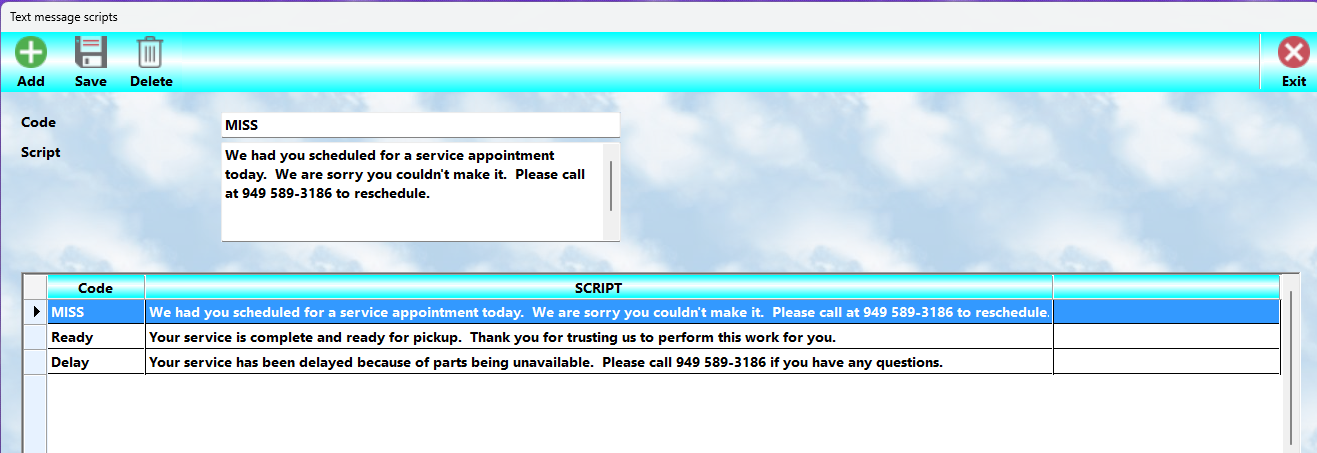
To simplify communication, MLS 2026 includes a Script Library system.
Scripts allow you to:
•Save commonly used messages
•Reuse standard notifications
•Improve consistency
•Reduce typing
Examples might include:
•Vehicle ready for pickup
•Waiting for approval
•Parts delayed
•Appointment reminder
•Follow-up request
Creating Message Scripts
Go to:
Text Options → Create Scripts
You may then:
•Add new scripts
•Edit existing scripts
•Delete unused scripts
Each script includes:
•A short identifying code
•The actual message text
Scripts may still be modified before sending.
Using Scripts When Sending Messages
When sending a text:
1.Select a saved script from the dropdown list
2.The message text automatically appears
3.Modify it if desired
4.Press Send
You may also type completely custom messages without using scripts.
Required Client Information
To send text messages:
•A phone number must exist in the client Cellular field
The system does NOT require:
•Mobile carrier information
MLS 2026 automatically handles message routing through the Twilio network.
Text Logging
MLS 2026 maintains a text message log for tracking purposes.
The system can record:
•Date and time
•Recipient number
•Related account/workorder
•Message content
This provides:
•Communication tracking
•Customer service verification
•Historical reference
Important Notes
•An active internet connection is required
•Twilio service fees are billed directly by Twilio
•Only outbound SMS messaging is currently supported
•Messaging regulations may vary by location
•Shops should avoid unsolicited marketing texts
•Customers should provide consent for SMS communication when required by law
MLS 2026 provides the integration tools, while Twilio supplies the messaging network and delivery services.