Although you may want to jump right in and start processing workorders, your first steps should involve configuring the core information used throughout MLS 2026. These settings control how the program behaves, how information is validated, how documents are printed, and how data is processed throughout your shop.
Most setup functions are accessed from the Tools button on the main menu bar. Taking time to configure these areas properly will make your daily operation faster, more accurate, and far more consistent.
Lists
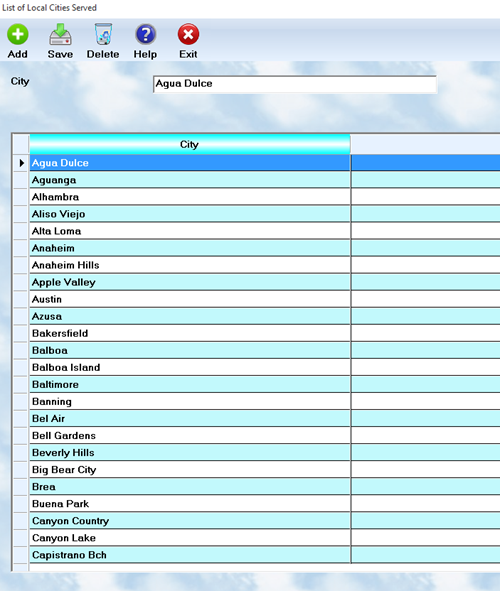
Validation Lists help standardize the information entered by employees. Consistent data entry improves searches, reporting, marketing selections, and overall system reliability.
Examples include:
•Cities
•States
•Service categories
•Appointment assignments
•Payment types
•Vehicle colors
•Client ratings
•And many other commonly used values
Throughout MLS 2026, many fields provide either a dropdown lookup button or a magnifying glass lookup icon.
•The dropdown arrow usually displays items from a Validation List.
•The magnifying glass usually searches another database, such as Clients, Vehicles, Vendors, or Inventory.
Using these lookup tools reduces typing, speeds data entry, and helps eliminate mistakes caused by inconsistent spelling or abbreviations.
To edit Lists, select the Tools button from the main menu bar and then choose Lists.
List editors use a split-screen layout:
•The upper section displays the editable data fields
•The lower section displays all records currently stored in the list
When you highlight a record in the lower browse window, its information automatically appears above for editing.
General list controls include:
•Add — Create a new entry
•Save — Store changes to the selected record
•Delete — Remove the highlighted entry
Always remember to save each record after making changes.
Well-maintained lists improve:
•Reporting accuracy
•Marketing selection quality
•Appointment scheduling
•Accounting consistency
•Search speed
•Overall shop organization
Setup
The Setup section controls many of the operational defaults used throughout MLS 2026.
Examples include:
•Tax rates
•Labor rates
•Invoice appearance
•Email configuration
•CRM automation
•Inspection checklist defaults
•Payment processing options
•Accounting links
•Merchant services
•Printing behavior
•Shop information
•Reminder settings
•System-wide processing defaults
Some setup areas also include utilities that can globally update information already stored in the system.
Because many of these settings directly affect accounting, invoices, reporting, and automated processes, changes should generally be performed only by management or the designated system administrator.
Before making major setup changes:
•Make sure all users are out of the system whenever instructed
•Verify current settings carefully
•Maintain current backups
•Test important changes before using them in daily production
A properly configured setup environment creates consistency throughout the entire operation and helps MLS 2026 function as a fully integrated business management system.