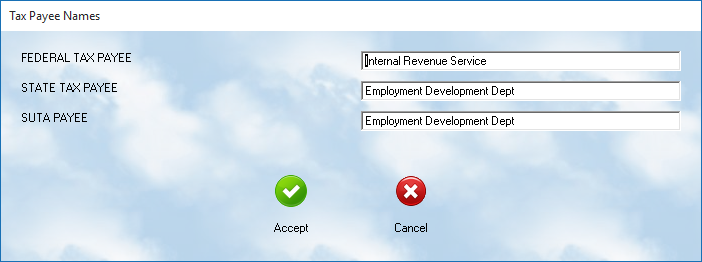
MLS 2026 allows payroll tax payments to be processed directly through the system.
To properly prepare payroll tax checks:
👉 the system must know the official payee names
for the agencies receiving the funds.
This utility screen is used to enter:
•Federal tax payment payees
•State tax payment payees
•SUTA payment agencies
These names are then used automatically when payroll tax payments are processed.
Purpose of This Setup
Payroll taxes are commonly paid to several different agencies, including:
•the Internal Revenue Service (IRS)
•state tax agencies
•state unemployment agencies
Rather than requiring the operator to type the information repeatedly:
👉 MLS 2026 stores the payment payee names in advance.
This helps:
•simplify payroll processing
•reduce typing errors
•improve consistency on printed checks and reports
Federal Tax Payee
Enter the official name of the:
👉 federal payroll tax agency
This is commonly:
•Internal Revenue Service
or
•IRS
depending on your company preference and payment requirements.
State Tax Payee
Enter the official name of the:
👉 state payroll tax agency
Examples may include:
•Franchise Tax Board
•Department of Revenue
•State Tax Commission
The correct name depends on:
•your state
•local payroll regulations
SUTA Payee
Enter the official name of the:
👉 State Unemployment Tax Agency
This may differ from:
•the regular state payroll tax agency
depending on how your state administers unemployment taxes.
Saving the Information
After entering or modifying the agency names:
👉 press the Accept button
to permanently save the values.
⚠️ If the information is not accepted and saved:
•the changes will not be retained by the system.
Why Accurate Payee Names Matter
Correct payee information helps ensure:
•payroll tax checks are prepared properly
•agency payments are processed correctly
•accounting records remain organized
•year-end reporting is simplified
Incorrect names may cause:
•delayed processing
•rejected payments
•accounting confusion
•payroll compliance issues
Recommended Best Practices
When setting up payroll tax payees:
•Use official agency names
•Verify names against payment coupons or agency notices
•Review agency names annually
•Update names if agencies reorganize or change titles
•Keep printed payroll tax reports for reference
Recommended Companion Sections
This section works closely with:
•Federal Payroll Tax Data Setup
•State Payroll Tax Data Setup
•Payroll Processing
•Payroll Tax Reports
•Payroll Troubleshooting
Together, these sections provide a complete payroll tax setup and payment workflow within MLS 2026.