Servicing Other Payroll Deductions (MLS 2026)
Before employee payroll deductions can be processed:
👉 the deduction companies or agencies must first be established.
These records identify:
•who receives the deducted funds
•where payments are sent
•how the accounting entries are posted
This setup is performed through:
👉 Tools → Company
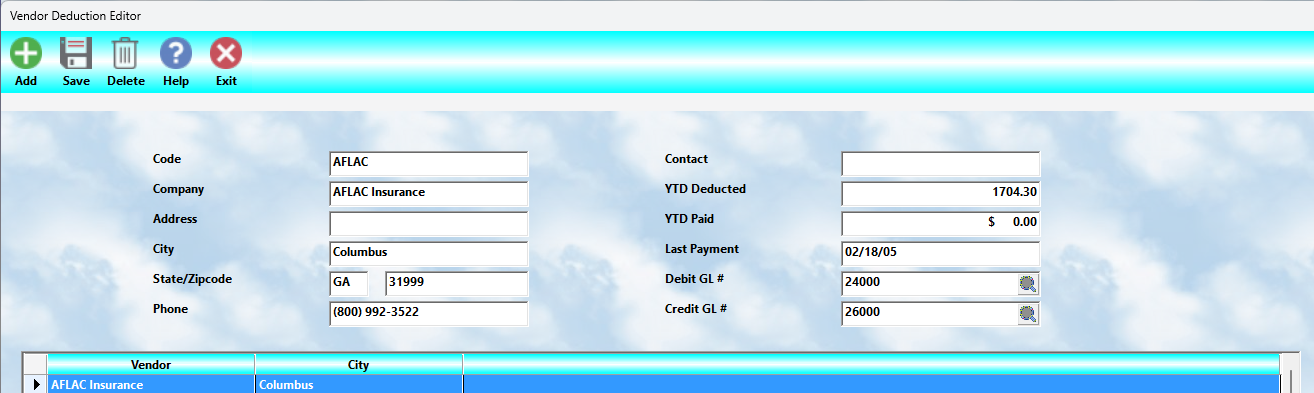
The screen shown in this section is used to maintain these deduction service providers.
Purpose of Deduction Companies
Many payroll deductions involve payments to outside organizations such as:
•insurance companies
•retirement administrators
•union organizations
•garnishment agencies
•savings plans
•benefit providers
MLS 2026 tracks:
•amounts withheld from employees
•payments made to the vendors
•General Ledger accounting
•year-to-date balances
for each deduction company.
Company Information
Each deduction company record contains:
•company identification
•contact information
•accounting setup
•deduction totals
•payment tracking
This information is later used automatically during:
•payroll processing
•deduction accounting
•vendor payments
•reporting
Code
Each company must have a:
👉 deduction code
This code is user-defined.
⚠️ Recommendation:
Use:
•short
•simple
•memorable
codes.
Most businesses use:
👉 3-letter codes
Examples:
•INS = Insurance
•IRA = Retirement
•UNI = Union
•MED = Medical
Simple codes make payroll maintenance much easier.
Company Information Fields
The following information should be entered for each deduction company:
•Company Name
•Address
•City
•State / Zip Code
•Phone Number
This information is used:
•when preparing checks
•when reviewing deduction status
•for vendor contact purposes
Contact Person
Enter:
👉 the primary contact person
for the deduction company or agency.
This can be very helpful when:
•resolving payment questions
•verifying deductions
•handling employee benefit issues
YTD Deducted
The:
👉 Year-To-Date Deducted
field tracks:
•the total amount withheld from employee paychecks
during the current year.
This amount is updated automatically during payroll processing.
YTD Paid
The:
👉 Year-To-Date Paid
field tracks:
•the total amount actually paid to the deduction company
through vendor payments.
This allows management to verify:
•withheld funds
•payments issued
•outstanding obligations
Last Payment Date
The:
👉 Last Payment
field updates automatically whenever:
•a payment check is processed
for the deduction company.
This provides a quick reference for:
•payment verification
•vendor status review
•compliance tracking
Extremely Important Payroll Reminder
⚠️ Money withheld from employee paychecks is NOT company income.
Those funds:
👉 belong to the employee or designated agency
and must be paid promptly.
Government agencies often impose:
•strict payment deadlines
•reporting requirements
•penalties for delays
The same prompt payment philosophy should also be used for:
•insurance providers
•retirement plans
•benefit vendors
Failure to remit deductions on time may lead to:
•penalties
•interest
•employee disputes
•legal exposure
General Ledger Posting
Each deduction company requires:
•a Debit G/L account
•a Credit G/L account
These accounts control how payroll deductions are posted within accounting.
Typical Accounting Flow
When deductions are withheld:
•A Liability account is generally Credited
•An Expense account is generally Debited
When payment is later made to the vendor:
•The Liability account is Debited
•The Bank account is Credited
This process ensures:
•accurate liability tracking
•proper payroll accounting
•balanced General Ledger posting
Employee Deduction Records
⚠️ Creating the deduction company alone does NOT activate payroll deductions.
Each employee must also have:
👉 an individual deduction record
configured within:
👉 Other Payroll Deductions
on the employee setup screen.
That section controls:
•deduction amounts
•calculation timing
•employee-specific withholding
Why Proper Deduction Setup Matters
Incorrect deduction setup can lead to:
•payroll balancing errors
•unpaid vendor obligations
•employee complaints
•accounting inaccuracies
•tax reporting problems
Careful setup and periodic review are strongly recommended.
Recommended Best Practices
When maintaining deduction companies:
•Use simple deduction codes
•Verify vendor information carefully
•Review liability balances regularly
•Pay withheld funds promptly
•Reconcile YTD deducted vs paid totals
•Coordinate deduction accounting with your accountant
Recommended Companion Sections
This section works closely with:
•Other Payroll Deductions
•Employee Withholding and Deductions
•Payroll Processing
•Payroll Reports
•Payroll Tax Payment Setup
•Payroll Troubleshooting
Together, these sections provide a complete payroll deduction and benefit payment management workflow within MLS 2026.