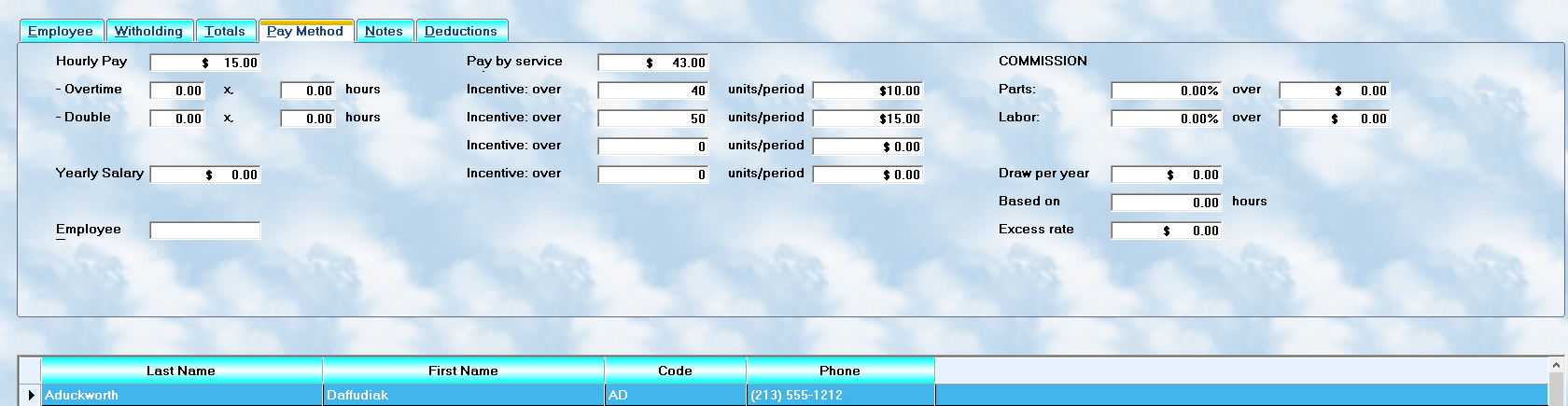
Employee compensation can become extremely complex in modern service businesses. MLS 2026 was designed to support a wide range of payroll methods so that businesses can create compensation plans that match their actual operations.
Some employees may be paid:
•hourly
•salary
•flat rate
•commission
•draw
•incentive bonuses
•or combinations of these methods
MLS 2026 supports:
👉 any combination of payment calculation methods
for an individual employee.
This flexibility allows the system to handle:
•technicians
•managers
•sales personnel
•support staff
•hybrid compensation systems
with considerable accuracy.
Accessing Pay Methods
All compensation setup is performed on the:
👉 Pay Methods tab
within:
👉 Employee → Edit
The values entered here determine:
•how payroll is calculated
•what rates are used
•how commissions are computed
•how overtime is handled
•how incentive pay is applied
⚠️ Because payroll calculations depend directly on this information, setup should always be reviewed carefully.
Hourly Pay
Some employees are compensated based on:
👉 actual hours worked
Enter the employee’s:
•hourly wage rate
in the Hourly Pay field.
Example:
•$25.00 per hour
If hourly compensation is not used:
•leave the field blank
Hourly pay is commonly used for:
•clerical staff
•support employees
•service advisors
•general labor personnel
Overtime and Doubletime
U.S. federal labor laws generally require overtime pay when employees exceed:
•40 hours per week
The standard overtime rate is usually:
👉 150% of normal pay
(1.50 multiplier)
Under some circumstances:
👉 Doubletime
(200% or 2.00 multiplier)
may also apply.
Overtime Setup
Two values are required:
•Pay factor
(typically 1.50)
•Base hours before overtime begins
(typically 40)
Example:
•1.50 after 40 hours
Doubletime Setup
Doubletime uses the same structure:
•multiplier
•threshold hours
If your company does NOT use doubletime:
⚠️ enter the same values used for standard overtime.
This prevents unexpected calculation behavior.
Salary
The Salary field contains:
👉 the annual salary amount
This method is commonly used for:
•owners
•managers
•executives
•salaried personnel
However, salary may also be combined with:
•commissions
•bonuses
•incentives
Example:
A sales manager might receive:
•$12,000 annual base salary
plus
•parts sales commissions
The system calculates both automatically.
Employee Type
MLS 2026 classifies employees into five categories.
⚠️ Important:
These categories affect:
•identification
•reporting
•General Ledger assignment
—but NOT payroll calculations directly.
Employee Type Codes
M — Management
Owners, executives, and management personnel.
Usually compensated by:
•salary
•draw
•profit participation
S — Support
Employees who support operations but do not generate billable labor.
Examples:
•supervisors
•parts managers
•service writers
T — Technical
Employees generating billable labor.
Examples:
•technicians
•diagnostic specialists
•production supervisors
C — Clerical
Office and administrative personnel.
Examples:
•secretaries
•bookkeeping staff
•reception personnel
L — Labor
General labor and shop support personnel.
Examples:
•detailers
•drivers
•maintenance staff
Commission Pay
MLS 2026 can calculate commissions based on:
•parts sales
•labor sales
•or both
The system totals all qualifying sales for the employee and applies:
•the commission percentage
after subtracting any specified:
👉 base amount
Understanding the Base ("Over") Amount
The:
👉 Over field
represents:
•the amount subtracted from total sales
before commission is calculated.
Example:
•Base sales requirement = $5,000
•Total sales = $7,000
•Commission basis = $2,000
If no commission percentage is entered:
⚠️ no commission will be calculated.
Flat Rate / Service Unit Pay
Many repair facilities compensate technicians using:
👉 Flat Rate Pay
Under this method:
•labor operations are assigned billable units
•employees are paid per unit completed
Example:
•Job time = 1.2 units
•Pay rate = $20.00 per unit
Payroll calculation:
•1.2 × $20.00 = $24.00 pay
Flat rate systems are common because they:
•reward productivity
•improve efficiency
•simplify labor costing
Incentive Pay
MLS 2026 supports:
👉 graduated incentive pay systems
for high-production technicians.
The system analyzes:
•total units completed during the pay period
and applies bonus rates above specified thresholds.
Example Incentive Structure
Units Completed |
Bonus Added |
Over 40 |
+ $1.00/unit |
Over 50 |
+ $1.50/unit |
Over 60 |
+ $2.00/unit |
Over 70 |
+ $2.50/unit |
Example Calculation
If a technician completes:
•63 units
with:
•base rate = $18.00/unit
MLS 2026 calculates:
•40 units @ $18.00
•10 units @ $19.00
•10 units @ $19.50
•3 units @ $20.00
The next pay period recalculates independently.
Important Productivity Warning
⚠️ Incentive systems can improve productivity dramatically.
However:
•quality control policies are essential
Technicians rushing work to maximize bonuses may create:
•comebacks
•customer dissatisfaction
•warranty losses
A strong comeback policy is highly recommended.
Draw Per Year
Some employees are compensated using:
👉 annual draw systems
This is common for:
•sales personnel
•management
•commission-based employees
Enter:
•annual draw amount
Optionally specify:
•hours included in the draw period
If employees receive:
•additional hourly compensation beyond the draw
enter:
•excess hourly rate
MLS 2026 then calculates:
•base draw
plus
•excess hour compensation
automatically.
Calculation Methodology
MLS 2026 automatically analyzes which compensation categories apply to the employee.
The system can combine:
•hourly pay
•commissions
•flat rate
•salary
•incentives
•overtime
•draw systems
into a single payroll calculation.
This allows businesses to create extremely flexible compensation plans while still maintaining:
•accurate payroll
•proper accounting
•complete reporting
Why Proper Setup Matters
Compensation setup directly affects:
•payroll checks
•taxes
•commissions
•productivity reporting
•labor costing
•profitability analysis
Incorrect setup can lead to:
•inaccurate payroll
•overpayments
•underpayments
•reporting problems
•employee disputes
Careful setup and periodic review are strongly recommended.
Recommended Best Practices
When configuring employee compensation:
•Keep pay structures simple when possible
•Document all compensation agreements clearly
•Verify commission percentages carefully
•Review incentive structures regularly
•Monitor comeback and warranty trends
•Audit payroll calculations periodically
Recommended Companion Sections
This section works closely with:
•Payroll Overview
•Employee Setup Overview
•Employee Withholding and Deductions
•Payroll Processing
•Costing Setup
•Payroll Reports
•Payroll Troubleshooting
Together, these sections provide a complete employee compensation and payroll management workflow within MLS 2026.