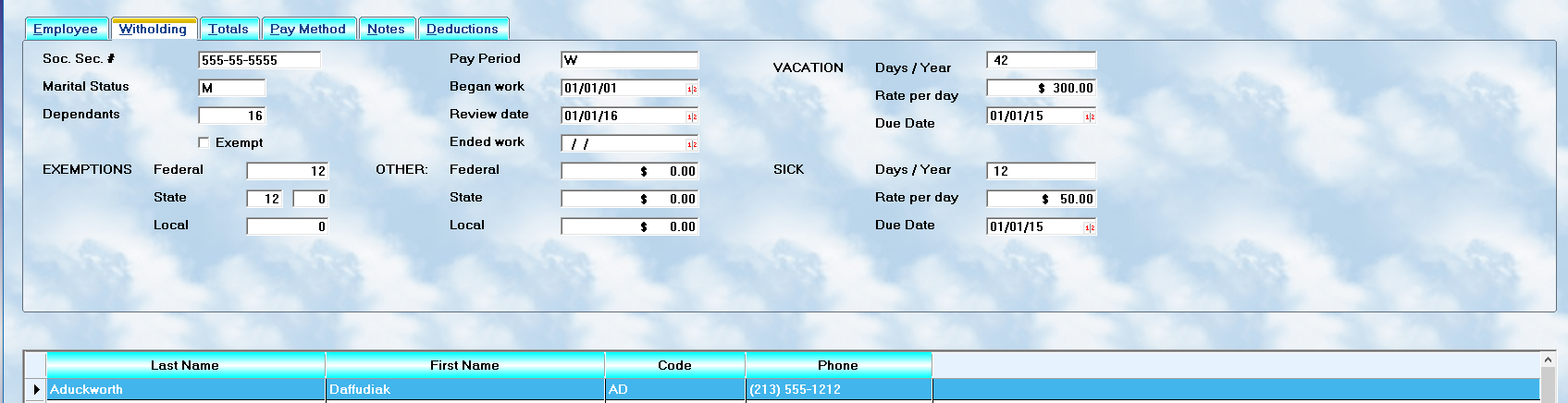
To view and edit employee withholding information:
•highlight the desired employee record
•select the
👉 second folder tab
This section contains the information used for:
•payroll tax calculations
•deductions
•withholding amounts
•payroll period processing
•vacation tracking
•sick pay tracking
⚠️ Accurate setup in this area is extremely important because payroll taxes and deductions are calculated directly from the values entered here.
Social Security Number
Each employee must have a valid:
👉 Social Security Number (SSN)
entered into the first field.
The SSN is required for:
•payroll processing
•tax reporting
•W-2 preparation
•government reporting
⚠️ All employees must have an SSN on file before payroll is processed.
Marital Status
Payroll withholding calculations depend heavily on the employee’s:
👉 marital status
MLS 2026 uses this value to select the proper withholding tables.
Enter:
•S = Single
(includes Head of Household for withholding purposes)
•M = Married
⚠️ Important:
Federal withholding calculations within payroll processing use only:
•Single
•Married
for table selection.
If this field is left blank:
👉 the system automatically defaults to Single status.
Dependents
Enter the employee’s:
👉 actual number of dependents
This should reflect:
•real dependents
—not the calculated deduction amount from tax forms.
The dependents value affects withholding calculations used by the payroll system.
Exemptions
The exemption amounts are derived from the employee’s:
👉 Federal W-4 form
Enter the resulting values into the appropriate fields.
Federal Exemptions
Enter:
•the federal exemption result
as calculated from the W-4.
State and Local Exemptions
Some states separate exemptions into multiple categories such as:
•dependents
•itemized deductions
•allowances
For this reason, MLS 2026 may provide:
•two state/local exemption fields
If required:
•enter dependent allowances in the first field
•enter additional deduction allowances in the second field
Because state requirements vary:
⚠️ always verify local payroll regulations when setting up withholding.
Additional Withholding
Some employees request:
👉 extra withholding amounts
to cover:
•spouse income
•outside income
•self-employment obligations
•anticipated tax liability
Additional withholding may be entered for:
•federal taxes
•state taxes
•local taxes
The specified amount is deducted automatically during each payroll cycle.
Practical Hint
Some employees request temporary extra withholding for only:
•a few payroll periods
•part of the year
•bonus periods
This amount can easily be:
•increased temporarily
•processed through payroll
•reset later to 0.00
without affecting payroll history or totals.
Pay Period
Each employee must be assigned a:
👉 Payroll Processing Period
This determines:
•when the employee is paid
•which tax tables are used
•whether the employee appears during payroll processing
The valid payroll period codes are:
•W = Weekly
•B = Bi-Weekly
•S = Semi-Monthly
•M = Monthly
⚠️ Important:
Employees without a valid payroll period:
•will NOT process through payroll
•may not calculate correctly
Begin / End Employment Dates
Employee employment dates should always be maintained carefully.
Begin Date
Enter:
👉 the employee’s hire date
This may represent:
•original hire date
•most recent hire date
depending on company policy for rehired employees.
End Date
If the employee is terminated:
👉 enter the last date worked
Otherwise:
•leave this field blank
Former employees are often retained in the system for:
•payroll history
•W-2 reporting
•audit purposes
Review Date
The:
👉 Review Date
tracks when the employee should receive:
•performance evaluations
•compensation review
•wage discussions
Maintaining review dates helps ensure:
•timely evaluations
•organized personnel management
•regular pay review scheduling
Vacation Tracking
MLS 2026 can automatically track:
👉 earned vacation pay
The following information is required.
Days Per Year
Enter:
•the number of paid vacation days earned annually
Rate Per Day
Enter:
•the vacation pay amount per day
The system provides this amount automatically during payroll processing, although it may still be adjusted when necessary.
Due Date
Enter:
•the date when full vacation eligibility is earned
This is commonly:
•the employee’s annual anniversary date
Sick Pay Tracking
MLS 2026 can also track:
👉 sick leave benefits
The same three values are required.
Days Per Year
Enter:
•the number of sick days earned annually
Rate Per Day
Enter:
•the sick pay amount per day
The amount may be adjusted during payroll processing if necessary.
Due Date
Enter:
•the date when full sick leave eligibility is earned
This is commonly:
•the annual employment anniversary date
Why Accurate Withholding Setup Matters
Incorrect withholding information can lead to:
•payroll errors
•incorrect tax deductions
•employee complaints
•IRS problems
•year-end reporting issues
For this reason:
👉 employee withholding data should always be reviewed carefully before payroll processing begins.
Recommended Best Practices
When maintaining withholding information:
•Keep W-4 forms current
•Verify Social Security numbers carefully
•Review payroll periods regularly
•Update marital status when notified
•Confirm deduction changes promptly
•Review vacation and sick balances periodically
Recommended Companion Sections
This section works closely with:
•Payroll Overview
•Employee Setup Overview
•Payroll Processing
•Payroll Reports
•Payroll Setup Utilities
•Payroll Troubleshooting
Together, these sections provide a complete payroll withholding and employee deduction management workflow within MLS 2026.