Unlike federal payroll withholding, which follows a relatively standardized structure:
👉 state payroll withholding systems vary considerably.
Some states:
•use percentage-based calculations
•use formulas derived from federal withholding
•apply dependent credits
•calculate deductions from adjusted earnings
•require disability or unemployment contributions
For this reason, MLS 2026 separates:
•state payroll DATA settings
from:
•state payroll TABLES
This section covers:
👉 the data values and calculation settings
used during state payroll processing.
⚠️ A separate section handles:
👉 State Tax Tables
where actual withholding brackets and tax tables are maintained.
Why State Payroll Setup Is More Flexible
Federal payroll withholding uses highly standardized tables and calculations.
State systems, however, may:
•follow federal calculations
•partially follow federal calculations
•use completely independent methods
•require employer-only contributions
•apply employee credits differently
Because of this variation:
👉 MLS 2026 provides flexible state payroll configuration options.
State Disability Insurance (S.D.I.)
Some states require:
👉 State Disability Insurance (SDI)
contributions.
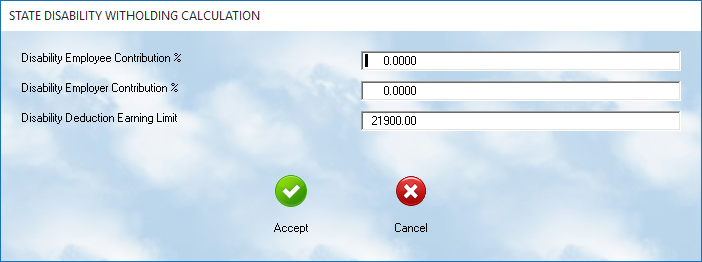
MLS 2026 allows entry of:
•employee contribution percentage
•employer contribution percentage
•earnings ceilings
for SDI processing.
Contribution Percentages
Enter:
•the employee percentage
•the employer percentage
as specified by your state payroll regulations.
Some states:
•require employee-only contributions
•require employer-only contributions
•require both
Earnings Ceiling
If your state applies a:
👉 maximum taxable earnings limit
enter that value in the earnings ceiling field.
Once the employee reaches the annual limit:
•no further SDI withholding is calculated.
States Without SDI
If your state does not require:
👉 disability insurance withholding
set all SDI values to:
•0.00
This disables SDI processing within payroll.
State Unemployment Tax (S.U.T.A.)
State unemployment processing is configured separately through:
👉 SUTA settings
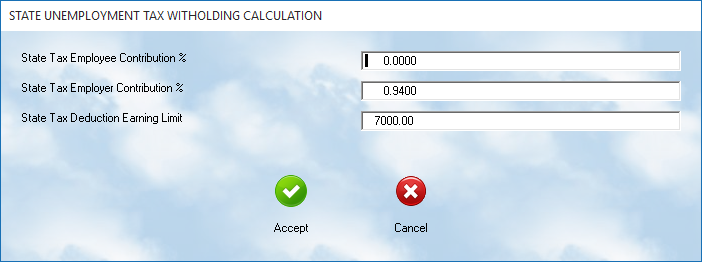
MLS 2026 allows entry of:
•employee contribution percentages
•employer contribution percentages
•taxable earnings limits
State Variations
State unemployment systems vary greatly.
Some states:
•charge only employers
Others:
•require both employer and employee contributions
Be sure to review:
👉 your specific state payroll requirements
before entering these values.
FUTA Interaction
Some states provide:
•unemployment credits
•reduced FUTA obligations
•offset adjustments
⚠️ Because these values can affect federal calculations:
always verify the relationship between:
•SUTA
and
•FUTA
during annual payroll setup.
Standard State Deduction Data
Many states use:
👉 deduction data values
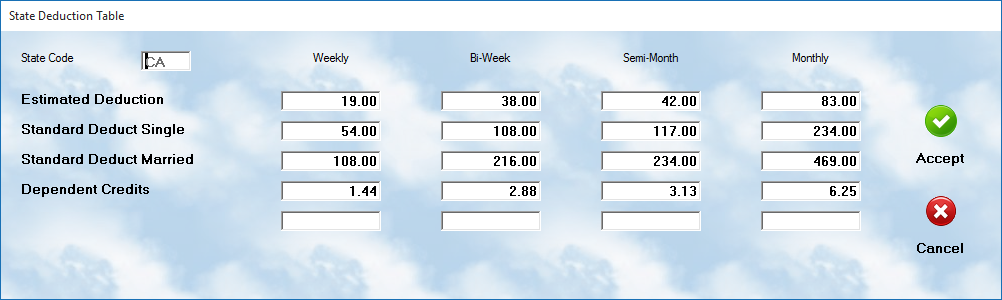
as part of their withholding formulas.
These values are not actual withholding tables, but:
•calculation allowances
•exemption adjustments
•deduction credits
used during payroll processing.
MLS 2026 separates these values into three sections.
Estimated Deduction Allowances
Some states allow:
👉 estimated deduction adjustments
based on:
•projected itemized deductions
•estimated tax reductions
•special withholding allowances
Enter the values specified by your state payroll documentation.
Standard Deduction Allowances
The:
👉 Standard Deduction section
contains allowance values used:
•before state tax calculations occur.
These are commonly divided into:
•Single
•Married
categories.
Dependent Tax Credits
Some states apply:
👉 dependent tax credits
AFTER withholding calculations are performed.
These credits reduce:
•final state withholding obligations
based on:
•dependents
•household allowances
•filing status
If your state does not use dependent credits:
👉 enter:
•0.00
for those values.
Payroll Period Entries
Each deduction category contains entries for:
•Weekly
•Bi-Weekly
•Semi-Monthly
•Monthly
payroll cycles.
Only the payroll periods actually used by your business normally require maintenance.
Difference Between State Data and State Tables
⚠️ Important Distinction:
This section handles:
👉 calculation data values
such as:
•percentages
•allowances
•deduction credits
•ceilings
The separate:
👉 State Tax Tables
section handles:
•actual withholding tax brackets
•tax ranges
•withholding calculations
Both areas must be configured properly for accurate payroll processing.
Why Accurate State Data Matters
Incorrect state payroll setup may lead to:
•inaccurate withholding
•payroll balancing issues
•employee paycheck errors
•underpayment penalties
•incorrect payroll reports
Because state laws change regularly:
👉 all state payroll data should be reviewed annually.
Recommended Annual Procedure
At the start of each payroll year:
•Review current state payroll publications
•Verify SDI percentages and limits
•Verify SUTA percentages and ceilings
•Review deduction allowances
•Confirm dependent credit values
•Test payroll calculations carefully
•Coordinate updates with your accountant if needed
Recommended Companion Sections
This section works closely with:
•Federal Payroll Tax Data Setup
•Federal Payroll Tax Tables
•State Payroll Tax Tables
•Employee Withholding and Deductions
•Payroll Processing
•Payroll Reports
•Payroll Troubleshooting
Together, these sections provide a complete payroll tax calculation and withholding management workflow within MLS 2026.