MLS 2026 includes:
👉 preloaded federal payroll tax tables
used for calculating:
•federal withholding
•payroll deductions
•employee tax obligations
These tables are installed with the software and are based on:
👉 the current IRS Federal Tax Guide for Employers
(Circular E / Publication 15)
Important Annual Responsibility
⚠️ Federal payroll tax tables change regularly.
It is:
👉 the responsibility of the system operator
to verify and update payroll tax table information whenever new federal tax guidelines are released.
Failure to maintain current tables may result in:
•incorrect payroll withholding
•employee tax shortages
•payroll reporting errors
•IRS penalties and interest
Accessing Federal Tax Tables
The federal withholding tables are accessed from:
👉 Employees → Utilities → Federal Tables
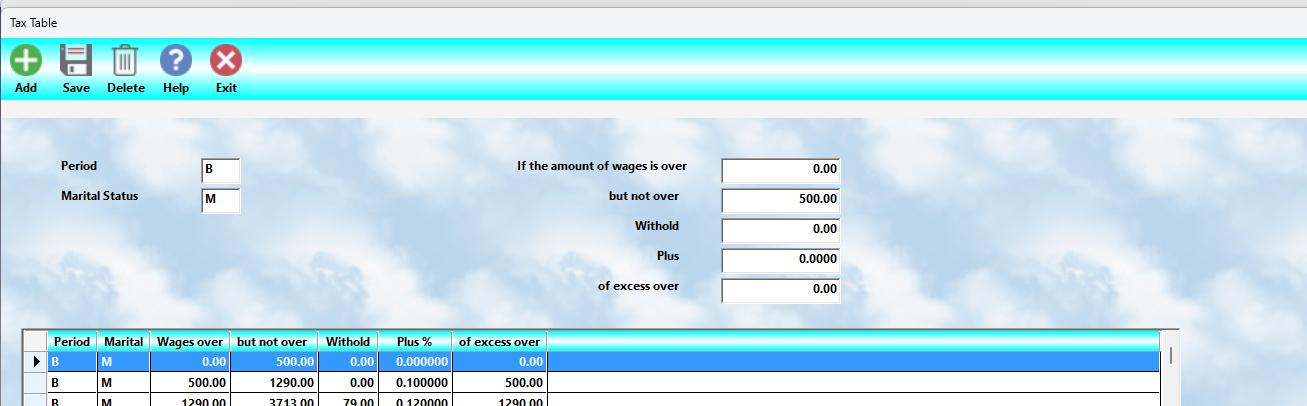
When selected, the system displays:
•payroll withholding tables
•tax ranges
•deduction brackets
•calculation values
in a format that closely matches the IRS published tables.
Updating Table Values
If changes are required for a new tax year:
1.Highlight the entry to be modified
2.Enter the updated values
3.Select the
👉 Save
button
to permanently retain the changes.
⚠️ Changes are not saved until the Save button is selected.
Payroll Period Types
MLS 2026 supports all standard payroll periods used by the IRS withholding schedules.
These include:
Payroll Period |
Description |
Weekly |
52 payrolls per year |
Bi-Weekly |
Every two weeks / 26 payrolls |
Semi-Monthly |
Twice monthly / 24 payrolls |
Monthly |
12 payrolls per year |
Although all table types are included:
👉 most businesses only need to maintain the table(s) used for their actual payroll cycle.
Example:
•Weekly payroll businesses generally only maintain Weekly tables
•Monthly payroll businesses generally only maintain Monthly tables
Marital Status Categories
The payroll withholding tables are also divided by:
👉 filing status
The supported categories are:
•Head of Household
•Single
•Married
The values entered into MLS 2026 should match the corresponding values shown in:
👉 the official IRS tax guide.
Table Values
The values entered into the payroll tables are copied directly from:
👉 the IRS withholding schedules
The MLS 2026 screen mirrors the IRS format closely so that operators can:
•compare values easily
•verify entries visually
•perform updates more accurately
Why Tax Table Accuracy Matters
Payroll calculations depend entirely on:
•the tax tables
•employee withholding setup
•payroll period selection
Incorrect tables can create:
•over-withholding
•under-withholding
•employee complaints
•payroll balancing issues
•government penalties
⚠️ Even small payroll errors repeated over many payroll cycles can become significant.
Recommended Annual Payroll Procedure
At the beginning of each payroll year:
•Obtain the latest IRS Circular E / Publication 15
•Review all payroll withholding tables
•Verify FICA and Medicare rates
•Confirm FUTA limits
•Test payroll calculations
•Run sample payroll reports
•Verify calculations with your accountant if necessary
Best Practice Recommendation
Before processing the first live payroll of the year:
👉 always perform a payroll test run.
This allows you to:
•verify withholding amounts
•confirm deductions
•test calculations
•avoid payroll correction work later
Recommended Companion Sections
This section works closely with:
•Federal Payroll Tax Data Setup
•Employee Withholding and Deductions
•Payroll Setup Utilities
•Payroll Processing
•Payroll Reports
•Payroll Troubleshooting
Together, these sections provide a complete payroll tax calculation and withholding management workflow within MLS 2026.