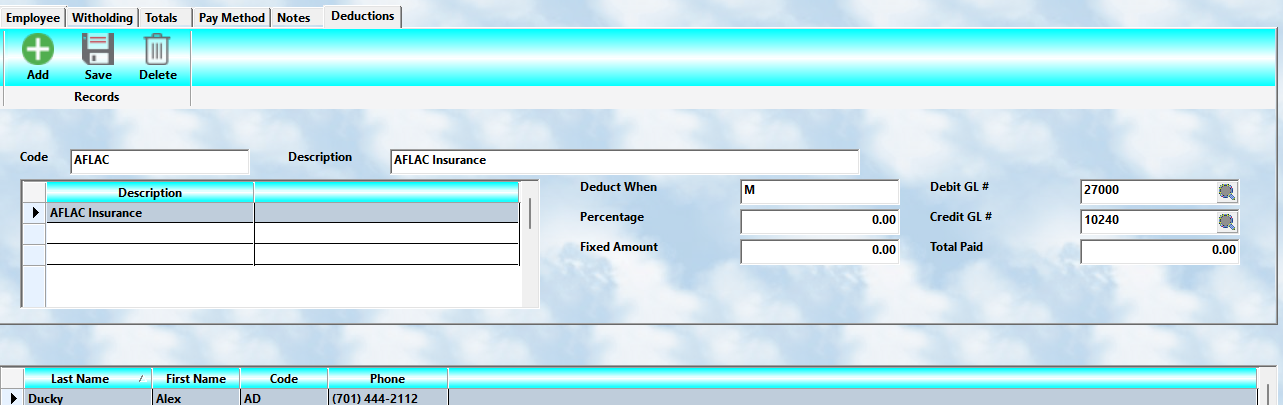
MLS 2026 allows you to create:
👉 additional payroll deductions
for individual employees.
These deductions are managed from the:
👉 final tab
within the Employee Payroll setup screen.
This feature provides tremendous flexibility for handling:
•insurance deductions
•retirement contributions
•garnishments
•union dues
•uniform fees
•tool charges
•savings plans
•and many other employee-specific payroll deductions
Setting Up Deduction Payees
Before employee deductions can be created:
👉 deduction payees must first be established.
Examples include:
•insurance companies
•retirement providers
•service organizations
•benefit administrators
These are configured through:
👉 Payroll Utilities → Company
Once the company/payee exists, it becomes available for employee deduction processing.
Creating a New Deduction
To create an employee deduction:
1.Highlight the employee in the browse list
2.Press the
👉 Add
button
3.Enter the deduction code
4.Press the Tab key
The system will automatically populate:
•default deduction information
•associated payee information
•related setup values
You may then modify any fields as needed.
Deduction Timing ("When")
The system must know:
👉 when the deduction should occur
during payroll calculation.
This is extremely important because some deductions:
•reduce taxable income
•occur after taxes
•affect net pay differently
The following processing options are available.
Gross
👉 Gross
The deduction is taken directly from:
•gross pay
before taxes are calculated.
This is commonly used for:
•certain retirement plans
•pre-tax benefits
•cafeteria plans
Federal
👉 Federal
The deduction occurs:
•after federal taxes are withheld
but before other deductions.
State
👉 State
The deduction occurs:
•after federal and state taxes are withheld
This is commonly used for:
•post-tax deductions
•voluntary payroll reductions
Keough
👉 Keough
This special deduction method works as follows:
1.The amount is deducted from gross pay
2.Taxes are calculated on the reduced balance
3.The amount is then added back into the employee’s net paycheck
This method is used for certain:
•retirement arrangements
•deferred compensation structures
In the deduction screen:
👉 enter:
•K
for Keough processing.
IRA
👉 IRA
This option:
1.deducts the amount from gross pay
2.calculates taxes on the reduced balance
3.deposits the amount into the IRA account
⚠️ Unlike Keough:
•the amount is NOT added back to the employee’s paycheck.
Use:
👉 I
for IRA processing.
Amount Calculation
The deduction amount may be entered as either:
•a percentage
or
•a fixed dollar amount
Percentage Deductions
If the deduction should be based on:
•payroll totals
•gross wages
•net wages
enter:
•the percentage value
The calculation will use the basis selected in the:
👉 When field
Fixed Amount Deductions
If the deduction is:
•a specific recurring dollar amount
enter:
•the fixed amount
The system applies this amount automatically during each payroll cycle.
Example:
If an employee is paid:
•twice monthly
and the monthly insurance premium is:
•$100.00
then:
👉 enter:
•$50.00 per payroll period
General Ledger Numbers
Each deduction posts automatically to the General Ledger.
Both:
•Debit
and
•Credit
accounts must be specified.
Debit Account
The:
👉 Debit G/L Account
receives the debit posting when payroll is processed.
Credit Account
The:
👉 Credit G/L Account
receives the corresponding credit posting.
⚠️ Proper G/L setup is extremely important to maintain accurate payroll accounting.
Deduction Totals
The system automatically tracks:
👉 total deductions
for the employee during the current year.
This running total is displayed on the screen for reference.
These totals are especially useful for:
•benefit tracking
•retirement reporting
•payroll audits
•year-end reconciliation
Why Proper Deduction Setup Matters
Payroll deductions directly affect:
•employee paychecks
•tax calculations
•payroll liabilities
•retirement contributions
•benefit accounting
Incorrect setup may lead to:
•payroll errors
•tax reporting issues
•incorrect deductions
•accounting imbalances
Careful setup and periodic review are highly recommended.
Recommended Best Practices
When configuring payroll deductions:
•Verify deduction timing carefully
•Confirm G/L account numbers
•Keep deduction agreements documented
•Review employee totals periodically
•Test new deduction setups before live payroll
•Coordinate retirement deductions with accountants or advisors
Recommended Companion Sections
This section works closely with:
•Payroll Overview
•Employee Setup Overview
•Employee Withholding and Deductions
•Employee Pay Methods
•Payroll Processing
•Payroll Utilities
•Payroll Reports
•Payroll Troubleshooting
Together, these sections provide a complete employee payroll deduction and benefits management workflow within MLS 2026.