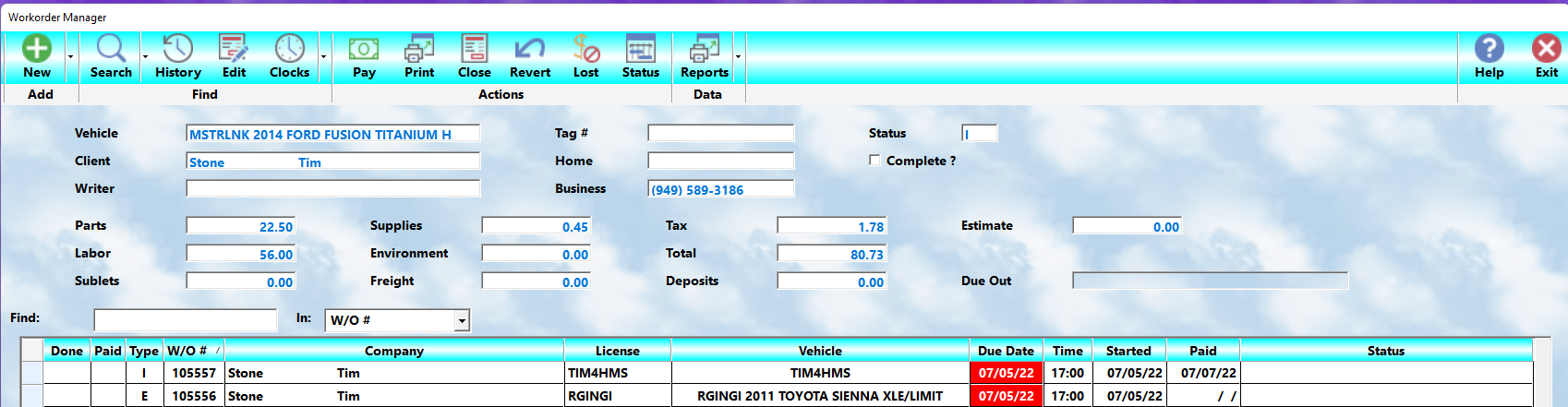
The MLS 2026 Workorder system is designed to provide fast access to both:
•Active work currently in progress
•Historical invoices previously completed
By default, when entering the Workorder Manager, the system displays only:
•Open workorders
This allows the service staff to focus on:
•Vehicles currently being serviced
•Pending deliveries
•Work still requiring action
However, every completed invoice remains permanently available in the history system and may be searched in several different ways.
The Default Workorder Display
When the Workorder option is selected from the main menu:
•All active workorders are displayed automatically
These are:
•Jobs currently in progress
•Estimates not yet completed
•Vehicles awaiting pickup
•Tickets still open in accounting
The display is normally arranged:
•In workorder number order
Scrolling through the list allows the operator to quickly review:
•Current shop activity
•Vehicle status
•Pending jobs
Completed Workorders
Once a workorder has been:
•Fully processed
•Closed
•And posted
the system automatically marks it as:
•A History item
Completed workorders no longer display on the default active work screen.
Instead, they are accessed using the:
•Search button
on the main Workorder screen.
Search Options
When the Search screen opens, several search and sorting options are available.
These allow workorders to be organized according to the information most useful for the current task.
Active Work Only
This is the default display mode.
Only:
•Open
•Pending
•Active
workorders are shown.
This view is most appropriate for:
•Service advisors
•Technicians
•Daily operations management
Completed Work Only — Invoice Number Order
This option displays:
•Only completed workorders
arranged in:
•Invoice number order
This is useful when:
•Reviewing historical billing
•Looking up older invoices
•Verifying completed accounting activity
All Workorders By Client
This option displays:
•Both open and closed workorders
arranged alphabetically by:
•Client name
This is extremely useful when:
•Reviewing complete client history
•Handling customer questions
•Researching prior repairs
•Reviewing long-term service patterns
All Workorders By Service Unit
This arranges all workorders by:
•Vehicle identification
typically:
•License number
•VIN
•Service unit code
This is especially valuable when:
•Researching recurring issues
•Reviewing service history on a vehicle
•Checking warranty concerns
•Evaluating repeat repairs
All Workorders By Payment Date
This option displays completed workorders arranged by:
•Payment date
This is useful for:
•Accounting review
•Daily balancing
•Deposit verification
•Revenue tracking
•Historical financial review
Locating A Specific Workorder
After selecting the desired search order:
•Begin typing into the search field
The system automatically moves:
•To the first matching record
•Or the nearest matching entry
Examples include:
•Workorder number
•Vehicle license
•Client company name
•Customer last name
Once near the desired record:
•Scroll normally through the list
•Highlight the correct entry
•Open it for viewing or editing
Search Speed
MLS 2026 performs searches dynamically while typing.
This allows very rapid access to:
•Client history
•Vehicle history
•Prior invoices
•Payment records
without requiring complicated search procedures.
Best Practices
•Use Active Work for daily operations
•Use Client search when discussing prior work with customers
•Use Service Unit search for vehicle-specific troubleshooting
•Use Payment Date search for accounting review
•Use Invoice Number search for archived billing questions
The MLS 2026 search system is designed to provide immediate access to virtually every workorder ever written, making historical service data one of the most powerful tools available to your shop.