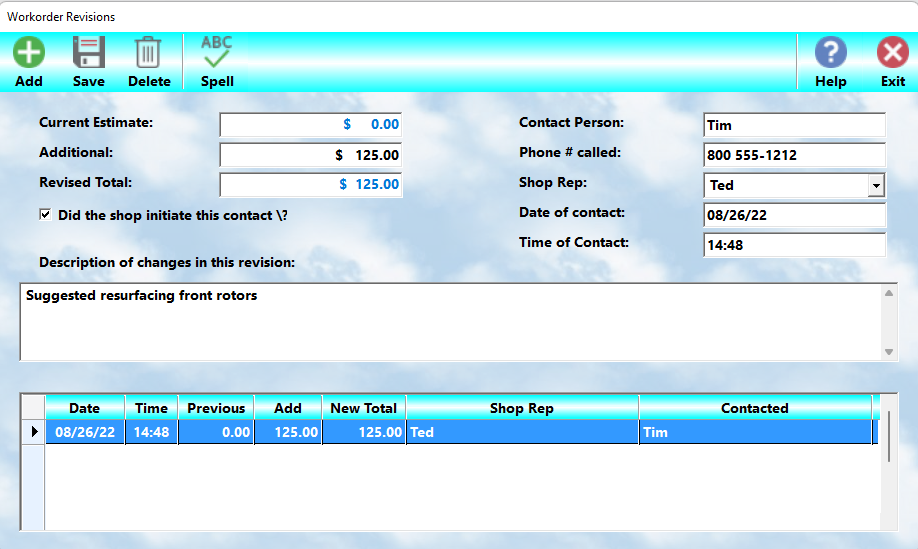
When a client approves an estimate, they naturally expect the final charges to remain within the amount originally discussed. Occasionally, however, additional problems are discovered during the service process that require more parts, labor, or related repairs.
Whenever charges will exceed the original estimate, the client should always be contacted before proceeding with the additional work.
MLS 2026 provides a Revision system specifically designed to:
•Document all estimate changes
•Record client authorization
•Track additional charges
•Maintain a permanent communication log
•Print revision details on the final invoice
This documentation protects both the shop and the client by clearly showing when additional authorization was obtained.
The Estimate Total
The original Estimate Total is stored in the system when an estimate is printed.
If no estimate was ever printed, the system assumes the original estimate amount was $0.00.
Each time a revision is entered:
•The additional amount is added to the estimate total
•The revised total is recalculated automatically
•The Workorder screen displays the updated estimate amount
•The letter R appears after the estimate total to indicate revisions exist
Entering a Revision
Select the Revise button from the Workorder Development screen.
The Revision dialog will then appear.
Each client contact regarding additional charges should be logged individually.
Revision Fields
Current Estimate
This field displays the current approved estimate amount automatically.
Additional Charges
Enter only the additional amount being added with this revision.
Do NOT enter the new grand total.
Example:
•Original estimate = $450.00
•Additional work = $125.00
Enter:
125.00
The system will calculate the revised total automatically.
If this field is left blank, no revision will be processed.
New Revised Total
The system automatically calculates and displays the new total estimate after adding the revision amount.
Person Contacted
Enter the full name of the person authorizing the additional work.
Avoid vague entries such as:
•“His wife”
•“Manager”
•“Bill”
Always use complete names whenever possible.
Accurate records can prevent disputes later.
Shop Representative
Enter the full name of the employee who made the contact.
Avoid abbreviations or nicknames.
Good documentation is important if questions arise later regarding authorization.
Time of Contact
The current time is entered automatically.
You may modify the value if necessary.
Maintaining accurate contact times is important for proper documentation.
The Contact Description
The description section explains:
•Why additional charges were necessary
•What was discovered
•What corrective action was approved
•Any related concerns or observations
This section should be written clearly and professionally.
Example Revision Narrative
During inspection of the windshield wiper concern, it was found that the left wiper motor had failed and the right blade arm was bent. The arm was straightened and reused, but replacement of the motor was required.
While performing the repair, wiring damage was discovered near the exhaust manifold. The damaged section was repaired and secured away from heat sources to prevent future failure.
Why Revision Documentation Matters
Clients are often cautious when additional charges appear beyond the original estimate.
A complete revision log:
•Builds trust
•Demonstrates professionalism
•Shows transparency
•Documents client authorization
•Reduces misunderstandings
•Helps avoid payment disputes
The goal is not simply to justify the added cost, but to clearly communicate why the additional work was necessary and how it benefits the client.
Best Practice
Whenever additional charges are required:
1.Stop work if appropriate.
2.Contact the client.
3.Clearly explain the findings.
4.Obtain authorization.
5.Enter a Revision immediately.
6.Continue work only after approval.
Accurate revision tracking is one of the most important protections a service facility can maintain.