Recommendations are an important part of professional vehicle service. They allow your shop to document current concerns, upcoming maintenance needs, wear items, and safety issues that should be addressed in the future.
Customers expect knowledgeable guidance regarding the condition and upkeep of their vehicles. Recommendations provide a written record of that advice and greatly improve communication between the shop and the client.
Relying only on verbal discussions is not sufficient and often results in misunderstandings or forgotten information.
Recommendations:
•Improve customer confidence
•Increase repeat business
•Document safety concerns
•Support preventative maintenance
•Create future sales opportunities
•Build long-term customer relationships
Recommendation Entry Screen
Recommendations are entered using a screen similar to Labor Entries.
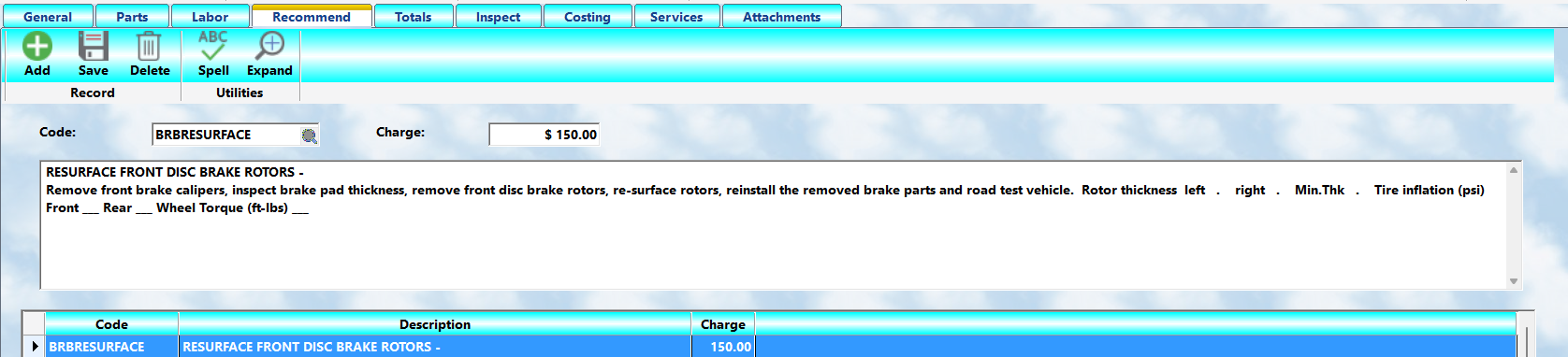
The Recommendation screen allows you to:
•Add new recommendations
•Edit existing entries
•Remove completed or unnecessary items
•Estimate future service costs
•Personalize messages for individual customers
Adding a Recommendation
To add a recommendation:
1.Press the Add button.
2.Enter a Glossary code or use the lookup icon.
3.Review or edit the displayed description.
4.Enter the estimated total charge.
5.Press Save.
If no appropriate Glossary code exists, enter B for blank lines and type a custom recommendation.
Remember:
•Press Add before entering data
•Press Save when complete
Using Glossary Entries
Recommendations use the same Labor Glossary system used for labor entries.
This allows:
•Fast entry
•Standardized wording
•Consistent communication
•Better reporting
•Easier technician training
Many shops create special Glossary entries specifically for recommendations and inspections.
Estimated Charge
The Charge field should contain the anticipated total cost for the recommended service, including:
•Labor
•Parts
•Sublet charges if applicable
This amount is intended as an estimate only and helps the client understand the approximate cost of future work.
Editing Recommendations
To modify an existing recommendation:
1.Highlight the recommendation in the lower browse list.
2.The full information will appear in the upper edit section.
3.Make your changes.
4.Press Save.
Changes made on the workorder affect only that workorder and do not alter the master Glossary entry.
Personalizing Recommendations
Personalized recommendations are often much more effective than generic statements.
For example, a brake inspection recommendation might be stored in the Glossary as:
BRAKE LINING: Your remaining brake lining is:
___ Left Front ___ Right Front
___ Left Rear ___ Right Rear
Brakes should be checked again by: //__
Brakes are a key safety feature of your vehicle. Failure to check them periodically may create dangerous operating conditions.
The technician can quickly personalize the entry by replacing the blank spaces with actual measurements or dates.
This approach:
•Saves typing time
•Maintains consistency
•Improves professionalism
•Creates customer confidence
Recommendation Codes
Recommendation Glossary codes should follow your normal coding standards.
Example:
•RE-BR = Brake Recommendation
•RE-TI = Tire Recommendation
•RE-FL = Fluid Service Recommendation
Avoid changing the Glossary code unless necessary because reports and tracking functions may rely on those codes for proper categorization.
Why Recommendations Matter
Recommendations are one of the most important marketing and communication tools in the system.
They:
•Show concern for customer safety
•Demonstrate professionalism
•Encourage preventative maintenance
•Increase customer retention
•Improve long-term service tracking
A shop that consistently documents recommendations appears organized, knowledgeable, and trustworthy.
Best Practice
Recommendations should:
•Be clear and professional
•Avoid abbreviations
•Explain concerns in customer-friendly language
•Include estimated timing when possible
•Focus on safety and reliability
•Never exaggerate problems
Well-written recommendations build trust and often generate future service opportunities naturally, without aggressive sales tactics.