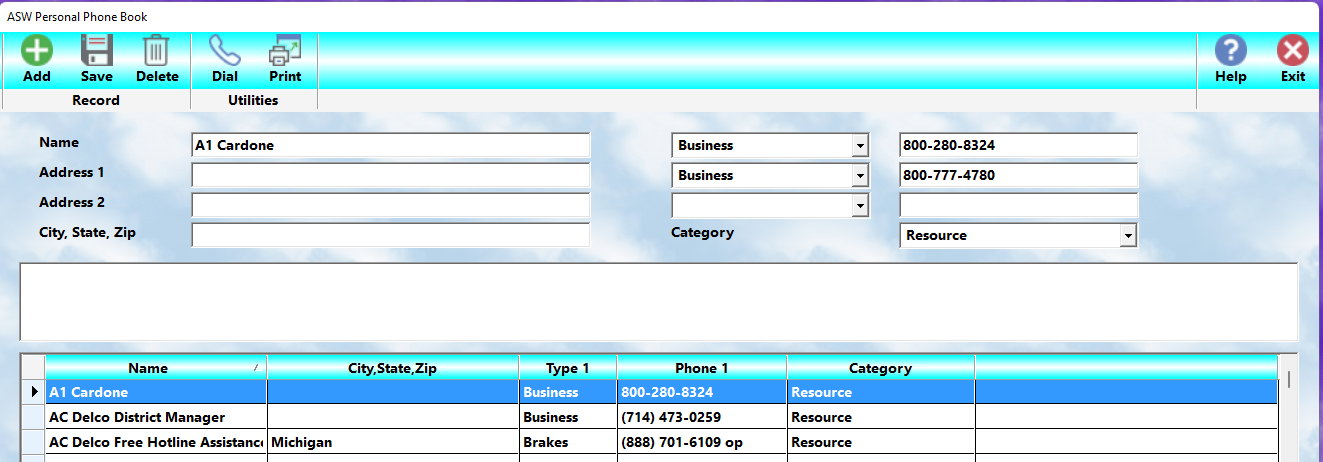
MasterLink Shop Writer includes a built-in Phone Directory that serves as a centralized address book for personal, business, and reference contacts that may not belong in the normal Client, Vendor, or Employee databases.
The directory is designed to provide quick access to commonly needed contact information from any workstation running MasterLink Shop Writer.
This feature is especially useful for:
•local suppliers not used in Accounts Payable
•towing companies
•emergency contacts
•insurance representatives
•utility companies
•landlords or property contacts
•personal reference numbers
•government agencies
•specialty service providers
•frequently used community resources
The Phone Directory is accessed by selecting the Phone icon within the program.
Benefits Of The Phone Directory
The Phone Directory helps eliminate:
•handwritten phone lists
•sticky notes
•paper rolodex systems
•scattered contact information
•duplicated effort between employees
Because the information is stored centrally, all authorized employees can access the same current contact information.
Name
Enter the name exactly as it will be easiest to locate later.
For example:
•Businesses are usually entered by company name
•Personal contacts may be easier by first name
•Specialty services might be listed by function
Examples:
•Joe's Towing
•Maria Sanchez
•Orange County Hazmat
•Fleet Tire Service
•ABC Glass Repair
Consistency is important.
If you maintain many personal entries, it may be easier to use:
Last Name, First Name
so the listing remains easier to browse alphabetically.
Address 1
Enter the primary street address for the contact.
This normally includes:
•street number
•street name
Example:
1250 Main Street
Address 2
This field is generally used for:
•apartment numbers
•suite numbers
•building identifiers
•department names
Example:
Suite 240
City, State, Zip
Enter the full mailing location for the contact.
Whenever possible:
•use official postal abbreviations for states
•include the full ZIP code
Accurate address information is helpful when:
•mailing correspondence
•locating vendors
•obtaining maps or directions
•generating reports
Phone Numbers
Each directory entry can store up to three separate phone numbers.
For each number:
Type
Use the drop-down list to specify the type of phone number.
Examples include:
•Business
•Home
•Mobile
•Emergency
•Fax
•Pager
Number
Enter the complete phone number including:
•area code
•prefix
•number
This is especially important for businesses operating across multiple geographic areas.
Category
Contacts may be grouped into categories for easier organization and lookup.
Examples might include:
•Personal
•Supplier
•Emergency
•Government
•Utilities
•Contractor
•Transportation
•Medical
•Reference
Using categories makes the directory significantly easier to manage as the list grows.
Automatic Dialing
Because businesses use a wide variety of:
•telephone systems
•PBX equipment
•VOIP systems
•outside line requirements
•workstation configurations
MasterLink Shop Writer does not include automatic dialing from the Phone Directory.
This avoids compatibility issues and prevents conflicts with specialized office phone systems.
Instead, the Phone Directory is intended to provide fast, centralized reference information accessible from throughout the program.
Best Practices
•Enter complete area codes for all numbers
•Use consistent naming methods
•Keep categories organized
•Remove outdated contacts periodically
•Verify important emergency numbers regularly
•Use descriptive business names for easier searching
The Phone Directory is a simple but valuable organizational tool that helps your staff quickly locate important contact information without interrupting workflow.
[TEditFormControlObj]