Payroll tax calculations depend entirely on:
👉 accurate federal and state tax setup information.
MLS 2026 provides utilities that allow the operator to maintain:
•taxpayer identification numbers
•FICA rates
•Medicare rates
•FUTA values
•federal withholding deduction amounts
⚠️ Because tax rates and deduction values may change from year to year:
👉 these areas should always be reviewed carefully at the beginning of each payroll year.
The setup screens shown in this section are used to enter and maintain the data required for payroll calculations.
Taxpayer Identification Numbers
Federal and state taxpayer identification numbers are required on:
•payroll reports
•tax filings
•W-2 forms
•payroll summaries
•government reporting documents
When this option is selected:
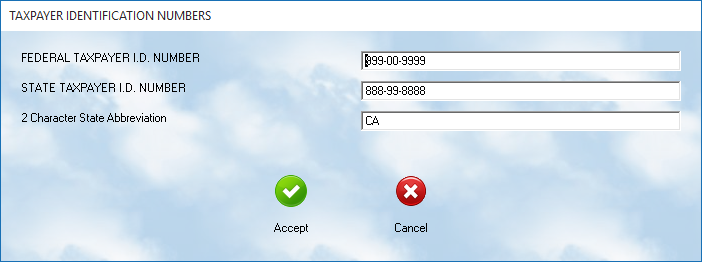
You may then:
•review
•edit
•update
the values as needed.
⚠️ Be certain these entries are accurate because they are used throughout payroll reporting.
State Identification
This same setup area is also used to specify:
👉 the state payroll processing table
Enter:
•the standard two-letter state abbreviation
Examples:
•CA = California
•TX = Texas
•NV = Nevada
The state code tells MLS 2026:
•which withholding rules
•deduction structures
•state payroll calculations
should be used during processing.
F.I.C.A. Setup
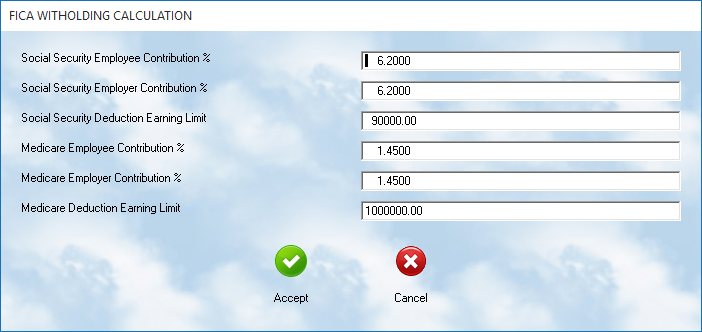
contains separate entries for:
•Social Security
•Medicare
The system displays:
•employee contribution percentage
•employer contribution percentage
•earnings limits
for each category.
Social Security
The left side of the screen contains:
👉 Social Security settings
These include:
•employee withholding rate
•employer matching rate
•maximum taxable earnings limit
Medicare
The right side of the screen contains:
👉 Medicare settings
These rates are maintained separately because:
•Medicare percentages differ from Social Security
•taxable limits may differ
•regulations may change independently
Annual Tax Updates
MLS 2026 is configured with current payroll tax rates when originally shipped.
However:
⚠️ tax rates may change annually.
Operators should review and update the values each year using:
👉 IRS Circular E
(The Employer’s Tax Guide)
or current federal payroll publications.
F.U.T.A. Setup
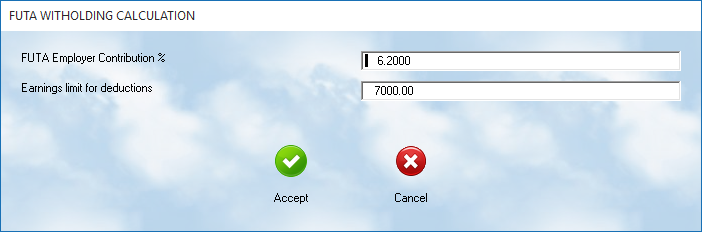
F.U.T.A.
(Federal Unemployment Tax Act)
is generally:
👉 paid by the employer
The setup screen contains:
•contribution percentage
•taxable earnings limit
These values may also change periodically and should be verified annually.
The current values should always be reviewed against:
👉 IRS Circular E
before beginning a new payroll year.
Federal Standard Deductions
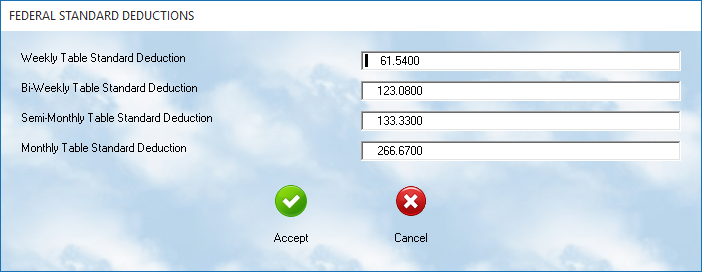
Federal payroll withholding calculations require:
👉 standard deduction values
for each payroll period type.
These values are found in:
👉 the Percentage Method Income Tax Withholding Tables
within IRS Circular E.
Payroll Period Types
MLS 2026 supports deduction values for:
•Weekly
•Bi-Weekly
•Semi-Monthly
•Monthly
The amount entered represents:
👉 the withholding allowance amount
for one exemption during that payroll cycle.
How The System Uses These Values
During payroll processing:
1.The employee’s exemption count is obtained
2.The standard deduction value is multiplied by the exemptions
3.The result is subtracted from gross pay
4.The remaining amount becomes the taxable payroll basis
MLS 2026 then calculates:
•withholding taxes
•FICA
•Medicare
•additional deductions
using the resulting payroll balance.
Why Accurate Tax Setup Matters
Incorrect payroll tax setup can lead to:
•incorrect withholding
•payroll check errors
•tax filing problems
•government penalties
•W-2 inaccuracies
For this reason:
👉 federal and state payroll values should always be reviewed before processing payroll for a new tax year.
Recommended Best Practices
When maintaining payroll tax data:
•Review tax tables annually
•Verify federal ID numbers carefully
•Confirm state processing codes
•Keep printed copies of Circular E
•Test payroll calculations after updates
•Coordinate major changes with your accountant
Recommended Companion Sections
This section works closely with:
•Payroll Overview
•Employee Withholding and Deductions
•Payroll Setup Utilities
•Payroll Processing
•Payroll Reports
•Payroll Troubleshooting
Together, these sections provide a complete payroll tax setup and processing workflow within MLS 2026.