Credit card processing is both an essential business function and a major area of concern for shop owners. Most customers now prefer to pay using:
•credit cards
•debit cards
•contactless payment systems
For this reason, MLS 2026 includes integrated Merchant Services support with selected third-party providers.
Choosing a Merchant Provider
Business owners are frequently approached by merchant service sales organizations offering:
•“special rates”
•“guaranteed savings”
•“exclusive programs”
•“association discounts”
Some providers are reputable and dependable. Others may offer:
•poor support
•unstable systems
•hidden fees
•aggressive contracts
•inconsistent service
At MasterLink Software, many merchant companies request integration into MLS 2026. However, we intentionally limit supported providers to companies with:
•proven stability
•long-term operating history
•reliable support
•dependable processing systems
This helps protect our clients from processing and support problems.
How MLS 2026 Handles Merchant Integration
MLS 2026 uses a secure integration model.
The software:
•sends transaction information to the merchant processor
•allows the processor to complete the transaction independently
•receives back only the information required for record keeping
⚠️ Important:
MLS 2026 does NOT store:
•full credit card numbers
•sensitive card data
Instead, the system stores:
•transaction identifiers
•authorization information
•processing references
This design improves security and helps support PCI compliance practices.
Benefits of Integrated Processing
Integrated merchant processing provides major advantages for the shop owner, including:
•faster customer checkout
•automatic accounting updates
•integrated receipt printing
•simplified reporting
•easier refund processing
•reduced manual entry errors
The transaction receipt and authorization details print directly on the:
•final invoice
providing a complete transaction record.
Supported Merchant Providers
The Merchant Services screen allows you to select the provider used by your business.
Currently supported providers include:
•Gravity Payments (formerly Charge It Pro)
•360 Payments
•World Pay (legacy accounts)
Additional integrations are evaluated carefully before being added to MLS 2026.
Merchant Services Control Bar
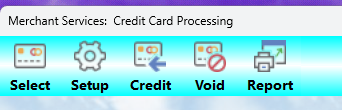
The control bar is used for:
•setup
•maintenance
•transaction management
•reporting
The following options are available:
Select
Use:
👉 Select
to choose the Merchant Services provider with whom you have contracted.
This establishes the active processing interface used by MLS 2026.
Setup
Use:
👉 Setup
to configure the merchant account connection.
This option walks you through the setup process required by your selected provider.
The exact steps vary by processor and may include:
•account credentials
•terminal configuration
•processing IDs
•communication settings
Credit
Use:
👉 Credit
to issue refunds back to customer credit cards.
Credits are processed against the original transaction reference stored by the merchant processor.
Void
Use:
👉 Void
to cancel eligible transactions before settlement.
Voids are generally limited by processor time restrictions.
Report
Use:
👉 Report
to generate merchant transaction summaries.
These reports include:
•approvals
•declines
•credits
•voids
•card type totals
and are extremely useful for:
•balancing
•bookkeeping
•reconciliation
•fraud monitoring
Important Security Reminder
Because merchant transactions involve financial risk:
⚠️ access to Merchant Services functions should be restricted to trusted personnel whenever possible.
Particular care should be used with:
•refunds
•voids
•manual adjustments
Best Practices
For reliable merchant processing:
•Use supported processors whenever possible
•Reconcile merchant reports regularly
•Review refunds and voids carefully
•Train staff on proper processing procedures
•Protect access to merchant setup functions
•Verify deposits against reports daily
Recommended Companion Sections
This section works closely with:
•Merchant Services Overview
•Credit Card Processing Procedure
•Signatures and Summaries
•Issuing Credits
•Voiding Transactions
•Credit Card Reports
•Banking Reconciliation
Together, these sections provide a complete merchant services and payment processing workflow within MLS 2026.