Employees may occasionally request:
👉 advances against pending earnings.
MLS 2026 provides an:
👉 Advance Processing
utility that allows these advances to be:
•recorded properly
•tracked automatically
•deducted from future payroll checks
This helps maintain:
•payroll accountability
•employee balances
•accurate accounting records
while preventing advances from being forgotten during payroll processing.
Accessing Advance Processing
Employee advances are entered through:
👉 Payroll → Processing → Advance
The system first asks for:
•the employee code
Once the employee is selected:
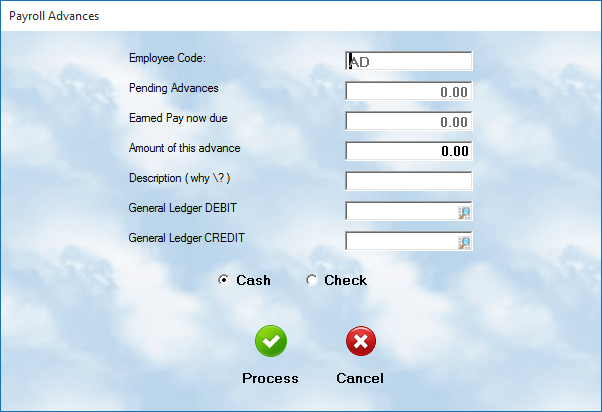
👉 the advance entry screen is displayed.
Pending Advance
The:
👉 Pending Advance
field displays:
•the total amount already advanced to the employee
•which has not yet been deducted from payroll
This helps management monitor:
•employee outstanding advances
•payroll exposure
•repayment status
⚠️ It is important to avoid allowing advances to exceed realistic earnings expectations.
Earned Pay Now Due
The:
👉 Earned Pay Now Due
field displays:
•the employee’s current gross earnings expected on the next payroll
This provides management with a quick estimate of:
•available payroll coverage
•employee earning status
•repayment ability
⚠️ Remember:
gross pay is NOT take-home pay.
Taxes and deductions often reduce actual net pay significantly.
In many cases:
•20% to 30% of earnings may be withheld
before the paycheck is issued.
Amount of This Advance
Enter:
👉 the amount being advanced
to the employee.
This amount will later be:
•deducted automatically from payroll
•tracked in employee records
•reflected in accounting
Description
Enter a brief explanation describing:
👉 why the advance is being issued.
Common examples include:
•emergency advances
•personal loans
•employee parts purchases
•tool purchases
•travel assistance
•temporary hardship situations
Clear descriptions are strongly recommended for:
•accounting clarity
•management review
•employee dispute prevention
General Ledger Debit & Credit
Enter the:
•Debit G/L account
•Credit G/L account
used for processing the advance.
These accounts control:
•payroll liability tracking
•cash movement
•accounting balance
The proper account setup should be coordinated with:
👉 your accountant
or accounting policies.
Cash or Check
Select the payment method used for the advance.
Cash
If:
👉 Cash
is selected:
•the amount is taken from the daily cash drawer
•the transaction is reflected on the daily Drawer Report
Check
If:
👉 Check
is selected:
•the system allows the operator to create and print a payroll advance check
for the employee.
Important Advance Warnings
⚠️ Employee advances should be handled carefully.
Common payroll problems involving advances include:
•advances exceeding earned wages
•employees leaving employment before repayment
•repeated employee borrowing
•payroll shortages
•accounting disputes
Some employees may continually request advances due to:
•poor financial planning
•recurring hardship
•personal budgeting problems
These situations can become difficult for employers to manage.
Legal Considerations
⚠️ Employers are generally NOT legally required to provide payroll advances.
Company policies regarding:
•advance limits
•repayment rules
•approval authority
should be clearly established.
Many businesses:
•limit advances
•require manager approval
•restrict frequency
•prohibit advances entirely
to avoid payroll complications.
Automatic Payroll Processing
Once entered:
👉 advances remain pending
until the next payroll cycle.
During payroll processing:
•the advance amount is automatically deducted from the employee’s net earnings
This ensures:
•proper repayment
•accurate payroll records
•balanced accounting entries
without requiring manual deduction calculations.
Recommended Best Practices
When handling payroll advances:
•Establish a written company policy
•Limit advances carefully
•Verify earned wages before advancing funds
•Require management approval
•Document all advance reasons clearly
•Review pending advances regularly
•Coordinate accounting entries with your accountant
Recommended Companion Sections
This section works closely with:
•Payroll Processing
•Employee Setup
•Payroll Deduction Setup
•Payroll Accounting
•Payroll Troubleshooting
•General Ledger Posting
Together, these sections provide a complete payroll management and employee compensation workflow within MLS 2026.