Many industries use:
👉 exchange components
where:
•the replacement part is sold immediately
•the old component must later be returned
to:
•rebuilders
•manufacturers
•suppliers
These returned components are commonly known as:
👉 cores.
MLS 2026 includes a fully integrated:
👉 Core Processing system
for tracking:
•customer core obligations
•returned cores
•vendor core credits
•core inventory
•outstanding core balances
throughout the business.
The system helps eliminate one of the most common inventory losses in repair operations:
👉 forgotten or misplaced cores.
Proper core management can represent:
•significant recovered income
•reduced inventory expense
•improved vendor credits
•better inventory control
within the operation.
What The Core System Tracks
MLS 2026 monitors:
👉 two major core categories:
•Cores currently owed by customers
•Cores currently on hand awaiting vendor return
The system maintains:
•quantities
•values
•customer balances
•vendor credits
•return history
automatically throughout processing.
Accepting Returned Customer Cores
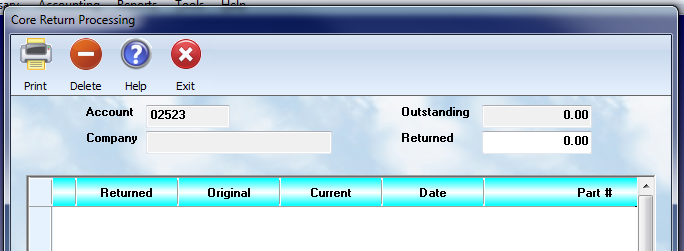
When a customer returns:
👉 outstanding cores
the first step is to:
👉 retrieve the customer's outstanding core list.
This is done by entering:
👉 the customer account number
when prompted.
MLS 2026 then displays:
👉 all outstanding cores
currently associated with that account.
Selecting Returned Core Items
The operator may:
•highlight
•review
•select
the returned inventory items.
The screen displays:
👉 the current outstanding quantity
for each core item.
The operator simply enters:
👉 the quantity actually returned.
This process continues until:
👉 all returned cores
have been entered.
Saving Core Entries
⚠️ After each core return entry:
👉 select:
•Save
to retain the information.
If Save is not selected:
👉 the entry will not be stored.
Processing Customer Core Returns
Once all returned cores have been entered:
👉 select:
•Exit
to process the transaction.
MLS 2026 then:
•updates core records
•adjusts outstanding balances
•updates inventory tracking
automatically.
Customer Receipts
After processing:
👉 MLS 2026 prints:
•a customer receipt
documenting:
•returned cores
•quantities
•credits
•account activity
for customer records and internal auditing.
Credit Or Cash Refund
The system then asks whether:
👉 the core return should be:
•credited to the customer's account
or
•paid out as cash
from:
👉 daily receipts.
This allows businesses to handle:
•account customers
•cash customers
•counter sales
appropriately during core processing.
Outstanding Core Report
MLS 2026 provides:
👉 an Outstanding Core Report
listing:
•customers with outstanding cores
•part numbers
•quantities owed
•unit values
•total outstanding values
grouped by:
•customer name
•customer account number
Important Accounting Note
⚠️ Outstanding cores are NOT:
👉 unrealized income.
Customers have already:
👉 paid the core charge
during the original transaction.
The report simply tracks:
👉 cores still expected to be returned.
Returning Cores To Vendors
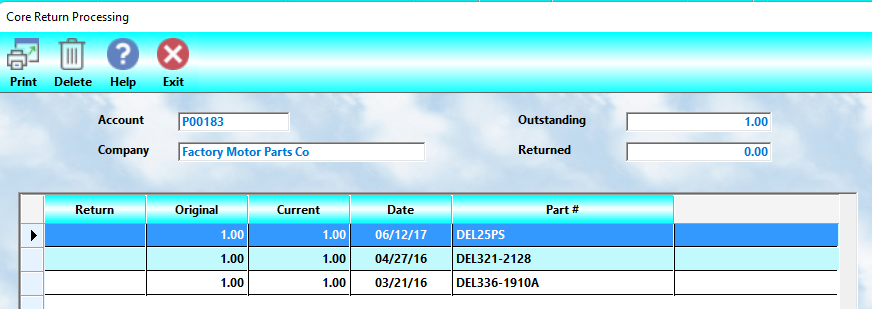
Once cores accumulate:
👉 they may be returned to vendors
for:
•vendor credits
•rebuilding
•exchange processing
within the supplier system.
Selecting Vendors
When:
👉 Return Cores To Vendor
is selected:
👉 MLS 2026 displays:
•vendors eligible for core returns.
After selecting the vendor:
👉 all available cores
for that vendor are displayed automatically.
Selecting Vendor Return Quantities
The operator may:
•highlight items
•review details
•specify quantities
to be returned.
The system displays:
👉 complete inventory information
for the highlighted item.
Enter:
👉 the quantity being returned
then:
👉 Save
the entry.
Continue until:
👉 all return items are identified.
Processing Vendor Core Returns
When all return quantities are complete:
👉 select:
•Exit
to process the return.
MLS 2026 then:
•updates core inventory
•adjusts inventory balances
•creates vendor credit totals
•processes accounting entries
automatically.
Vendor Return Reports
The system also prints:
👉 a vendor core return report
listing:
•all returned items
•quantities
•values
•vendor information
This document may be included with:
•shipments
•vendor paperwork
•internal records
during return processing.
Vendor Credits
After processing:
👉 MLS 2026 automatically posts:
•vendor credits
for:
👉 the value of the returned cores.
This integrates directly with:
•Accounts Payable
•vendor balances
•inventory valuation
•accounting records
throughout the system.
Current Core Status Report
MLS 2026 also includes:
👉 a Current Core Status Report
displaying:
•all cores currently on hand
•quantities
•unit values
•total values
grouped by:
•part number
•vendor
This provides management with:
👉 real-time visibility
into:
•unreturned vendor cores
•pending vendor credits
•core inventory value
within the business.
Why Core Tracking Matters
Cores are frequently:
•misplaced
•forgotten
•ignored
within repair facilities.
Without proper tracking:
👉 businesses may lose:
•vendor credits
•inventory value
•recoverable income
while increasing:
•inventory clutter
•accounting discrepancies
•operational inefficiency
The MLS 2026 Core Processing system helps eliminate these problems by fully integrating:
👉 core management
with:
•inventory
•accounting
•workorders
•vendor management
•customer tracking
throughout daily operations.
Recommended Best Practices
•Process customer core returns immediately
•Always provide receipts for returned cores
•Return vendor cores regularly
•Avoid allowing cores to accumulate unnecessarily
•Monitor outstanding customer cores routinely
•Review Current Core Status reports regularly
•Verify vendor core credits are properly received
•Maintain organized core storage areas
•Match returned quantities carefully during processing
•Review aging core inventory periodically
•Use consistent core handling procedures throughout the business
Recommended Companion Sections
This section works closely with:
•Inventory Editor
•Stock Input
•Workorders
•Vendor Management
•Accounts Payable
•Inventory Reports
•Returns Processing
•Inventory Costing
•Counter Sales
•General Ledger Integration
Together, these sections provide a complete inventory and core management workflow system within MLS 2026.