Sometimes a client will not pay their bill. When that happens, the remaining balance should be written off so it no longer appears as money you expect to collect.
This keeps your Accounts Receivable accurate and prevents old, uncollectible balances from distorting your financial picture.
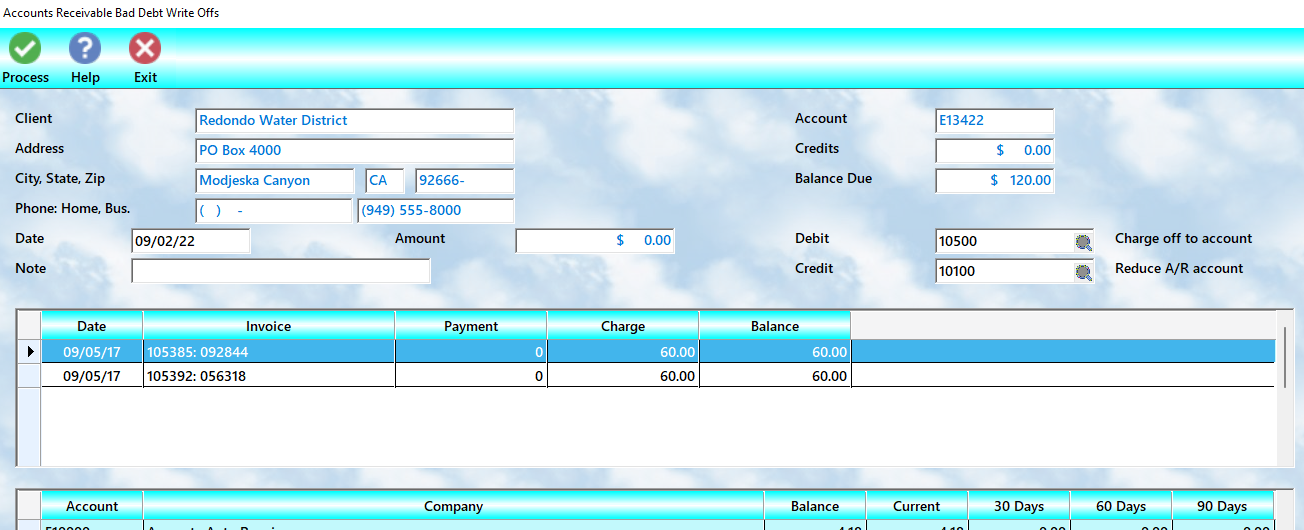
To begin, select A/R Tools → Write Offs.
How to Perform Write-Offs
Follow these steps to remove overdue or uncollectible balances:
1.Highlight the account you want to work on
2.Double-click the invoice line to adjust
3.A popup will display:
oCurrent balance due
oWrite-off amount field
4.Enter the amount to write off:
oFull amount → clears the invoice
oPartial amount → reduces the balance
5.Select OK
6.Repeat for additional invoices as needed
7.Move to the next account if necessary
8.When finished, select Process
What Happens Next
When you select Process, MLS 2026 will:
•Reduce or eliminate the selected balances
•Update the client’s A/R total
•Remove written-off amounts from active receivables
When to Use Write-Offs
Write-offs should be used when:
•Collection efforts have failed
•The account is no longer considered collectible
•You need to clean up old balances
Important Difference
A write-off:
•Removes the balance from A/R
•Acknowledges the loss
It does not represent payment—it reflects that the amount will not be collected.
Best Practice: Protect Against Repeat Problems
After writing off an account:
•Set the account Flag = HOLD
This prevents:
•New work being charged to the account
•Additional unpaid balances
Practical Note
Write-offs are never ideal—but they are better than carrying balances that will never be paid.
Clearing these accounts:
•Keeps your reports accurate
•Reduces clutter
•Helps you focus on collectible revenue