One of the best ways to build long-term client loyalty is to stay ahead of preventive maintenance needs and keep clients informed before problems occur.
MLS 2026 includes a fully integrated Preventive Maintenance (P/M) Scheduler that allows your business to:
•track recurring services
•monitor service intervals
•project future maintenance needs
•automatically update service records
•generate timely reminders
•improve customer retention
•increase repeat business opportunities
The P/M Scheduler works directly with:
•Service Unit records
•labor glossaries
•workorders
•service history
•CRM systems
•automated follow-up procedures
throughout MLS 2026.
There is no practical limit to the number of preventive maintenance services that may be tracked for a Service Unit.
The Preventive Maintenance Screen
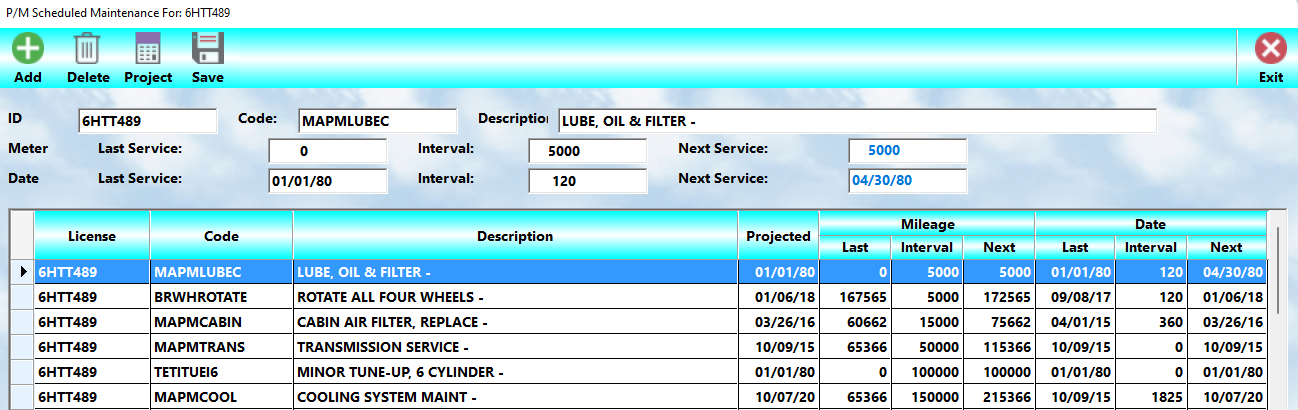
The P/M Scheduler screen displays all services currently being tracked for the selected Service Unit.
From this screen you may:
•add services
•edit existing intervals
•review service projections
•delete tracking entries
•monitor upcoming maintenance
The scheduler continuously updates itself as services are completed.
Code
Each tracked maintenance item must reference a valid:
👉 Labor Glossary Code
The code entered must already exist in the Labor Glossary system.
This ensures:
•standardized service descriptions
•consistent reporting
•automated updates
•proper integration with workorders
Labor Description
When the Labor Glossary code is entered, MLS 2026 automatically fills in the one-line summary description for the service.
This description identifies the maintenance item being tracked.
Mileage / Clock Tracking
The first method of maintenance tracking is based on Service Unit usage.
This is typically measured by:
•mileage
•operating hours
•clock time
•cycle usage
depending on the type of Service Unit being serviced.
These values appear in the first row of the tracking display.
Date Tracking
The second method of maintenance tracking is based on elapsed time.
Examples include:
•every 90 days
•every 6 months
•annually
•seasonal inspections
Date tracking allows services to be monitored even when usage is low.
These values appear in the second row of the display.
Last Service
The Last Service section displays:
•the last odometer or clock reading
•the last service date
for the selected maintenance item.
MLS 2026 updates this information automatically whenever the service is completed on a workorder.
This update occurs during:
👉 Daily Closing
No manual updating is normally required.
Interval
The Interval fields determine how often the service should be performed.
Examples:
•Oil Change:
o3,000 miles
o90 days
•Equipment Inspection:
o250 operating hours
o180 days
Both:
•usage intervals
and
•date intervals
may be tracked simultaneously.
Next Service
MLS 2026 automatically calculates:
•the next service date
•the next usage reading
based on:
•the last completed service
•the assigned intervals
This allows staff to quickly determine whether the Service Unit is approaching maintenance requirements.
Projected Date
The Projected field is calculated automatically by MLS 2026 and cannot be edited manually.
The system:
1.Calculates the average daily usage rate for the Service Unit
2.Determines when the mileage or usage interval will likely be reached
3.Projects the estimated maintenance due date
This feature is especially valuable because many Service Units reach mileage or operating-hour limits before the calendar interval expires.
For example:
•a service scheduled every:
o3,000 miles
oor 90 days
may actually become due in only 45 days if the Service Unit is heavily used.
The Projected Date allows:
•timely follow-up
•proactive client communication
•better scheduling opportunities
Creating A Preventive Maintenance Schedule
There are two primary methods for creating P/M schedules.
Method 1 — Direct Entry
You may manually create maintenance tracking records by:
1.Opening the Service Unit Editor
2.Selecting:
👉 P/M’s
3.Adding the desired services
4.Entering:
olast service information
omileage/clock intervals
odate intervals
This method is useful for:
•initial setup
•importing existing maintenance schedules
•creating long-term tracking plans
Method 2 — Directly From A Workorder
The easiest and most common method is from within a workorder.
While working on the Labor screen:
1.Highlight the desired labor item
2.Select:
 👉 Add PM
3.Enter:
omileage interval
oday interval
MLS 2026 then automatically creates the maintenance tracking record.
This method is fast, accurate, and requires very little additional data entry.
Re-Inspection Scheduling
The P/M Scheduler may also be used for:
•warranty inspections
•follow-up checks
•seasonal inspections
•maintenance reminders
•recurring evaluations
Example:
A shop may perform a repair and wish to inspect the Service Unit again in:
•30 days
or
•1,000 miles
By creating a P/M entry, MLS 2026 will automatically remind both:
•the shop
and
•the client
when the inspection becomes due.
Working With The Client
Preventive maintenance should always be discussed openly with the client during estimate preparation and service review.
If a client typically returns every:
•6,000 miles
but
•a maintenance item is due at 3,000 miles
the client should be informed immediately so they may decide whether to:
•perform the service now
or
•schedule a future visit
Waiting until after the client leaves the facility to recommend maintenance often:
•reduces trust
•creates confusion
•lowers closing rates
•increases the chance the service will be performed elsewhere
Involve The Client
Clients should feel involved in the maintenance planning process.
A professional discussion regarding:
•service intervals
•inspection schedules
•maintenance recommendations
•future needs
builds:
•trust
•professionalism
•long-term loyalty
Clients appreciate businesses that:
•monitor their service needs
•help prevent failures
•provide organized maintenance planning
rather than simply reacting to breakdowns.
Automatic Maintenance Tracking
Once maintenance schedules are created, MLS 2026 handles the tracking automatically.
When a tracked service is performed again:
•dates are updated
•mileage/usage readings are updated
•future projections are recalculated
•reminder schedules are adjusted
No additional manual maintenance is normally required.
This automation ensures that preventive maintenance records remain accurate and current.
Why The Preventive Maintenance Scheduler Matters
The Preventive Maintenance Scheduler is one of the strongest client retention tools within MLS 2026.
It helps businesses:
•increase repeat visits
•improve client communication
•prevent missed maintenance
•improve service planning
•increase service consistency
•identify future repair opportunities
•build long-term client trust
while helping clients:
•reduce breakdowns
•extend Service Unit life
•maintain warranties
•improve reliability
•manage operating costs
Recommended Best Practices
•Always attach maintenance tracking to recurring services
•Use both mileage/usage and date intervals whenever appropriate
•Review P/M schedules during every estimate discussion
•Add follow-up inspections for critical repairs
•Keep interval recommendations realistic
•Use standardized Labor Glossary codes
•Avoid excessive or unnecessary maintenance reminders
•Encourage technicians to review pending maintenance
•Use projected dates for proactive client communication
•Allow MLS 2026 to manage updates automatically
Recommended Companion Sections
This section works closely with:
•Service Unit Data
•Service History
•Workorders
•Labor Glossaries
•CRM Integration
•Recommendations
•Follow-Up Systems
•Reporting
•Daily Closing
•Client Data
Together, these systems create a complete preventive maintenance management platform within MLS 2026.