Most activity within MLS 2026 is posted to the General Ledger automatically.
Examples include:
•Workorders
•Accounts Receivable
•Accounts Payable
•Bank activity
•Payroll processing
•Inventory transactions
Because these systems are fully integrated, operators normally do not need to manually enter routine accounting activity.
When Manual Posting Is Used
Manual General Ledger posting is primarily used for:
•Accountant adjustments
•Fund transfers
•Depreciation entries
•Amortization entries
•Correcting balances
•Year-end adjustments
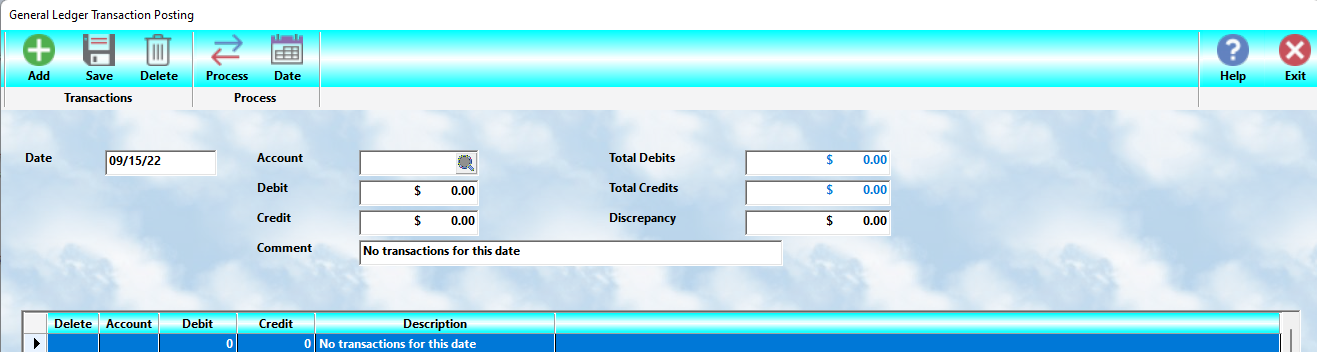
This option is accessed through:
•Ledger → Transaction Posting
Important Principle
⚠️ Do not manually post activity that MLS 2026 already posts automatically.
Doing so may:
•Duplicate accounting entries
•Create incorrect balances
•Distort financial reports
Manual posting should normally be limited to:
👉 special accounting adjustments.
Selecting the Posting Date
Before entering transactions:
•Enter the posting date
MLS 2026 then displays all transactions currently posted for that day.
The transaction window includes:
•Account number
•Debit amount
•Credit amount
•User comments
Automatically generated entries often include identifying information in the Comment field.
The transaction list is fully scrollable and can display all entries posted for the selected date.
Understanding Transaction Posting
Every General Ledger transaction must remain balanced.
That means:
Total Debits=Total CreditsTotal\ Debits = Total\ CreditsTotal Debits=Total Credits
If a Debit is entered:
•An equal Credit must also be entered
If a Credit is entered:
•An equal Debit must also be entered
Adding Transactions
 To add a new entry:
•Select Add
MLS 2026 opens entry fields for:
•Account number
•Debit amount
•Credit amount
•Comment
Enter the information as needed.
Important Posting Rule
After entering one side of the transaction:
👉 you must also enter the opposite side of the accounting entry.
Example:
Debit → Equipment Expense $500.00
Credit → Checking Account $500.00
The only exception is when:
•The ledger was already out of balance
AND
•The new entry restores the balance
Running Balance Verification
MLS 2026 continuously tracks:
•Total Debits
•Total Credits
The system displays status information at the bottom of the screen.
If the Ledger Is Balanced
A confirmation message indicates the entries are in balance.
If the Ledger Is NOT Balanced
MLS 2026 provides guidance such as:
To balance:
Add $4,000.00 to a DEBIT account
This helps operators identify what is needed to complete the transaction set correctly.
 Saving Entries
After entering or editing a transaction:
•Select Save
This stores the transaction entry properly.
⚠️ Saving an entry does not yet finalize posting to the General Ledger.
 Deleting Entries
Transactions displayed in the browse window may be deleted.
⚠️ However, corresponding Debit or Credit entries must also be removed to maintain balance.
Deleting only one side of a transaction will place the ledger out of balance.
Processing Transactions
 After all entries for the date are complete:
•Select Process
MLS 2026 then:
•Applies the transactions to the General Ledger
•Updates balances
•Saves the accounting activity permanently
Important Rule
⚠️ Transactions cannot be processed unless the ledger is balanced.
If:
•Debits ≠ Credits
the system will not allow processing.
Changing Dates
 The Date option allows you to:
•Review transactions for another date
•Enter postings for a different accounting period
Typical Manual Posting Examples
Common manual General Ledger postings include:
•Depreciation expense
•Loan adjustments
•Accountant year-end entries
•Asset transfers
•Bank corrections
•Amortization entries
Best Practices
•Allow MLS 2026 to handle normal automatic posting
•Use manual posting only for special adjustments
•Always verify Debits equal Credits
•Include clear comments for all manual entries
•Review transactions before processing
Important Perspective
Most daily business activity in MLS 2026 requires little or no manual General Ledger posting.
The purpose of this feature is primarily to:
•Fine-tune accounting records
•Enter accountant adjustments
•Maintain accurate financial reporting
For many businesses, manual postings occur only occasionally.