The Job Costing tab provides an immediate financial analysis of the current workorder. While the Totals screen shows what the client is being charged, the Job Costing screen shows the profitability of the work being performed.
This allows management to quickly determine:
•Gross profit
•Margin percentage
•Labor profitability
•Parts profitability
•Sublet profitability
•Overall workorder performance
The information is updated automatically as parts and labor are added or modified on the workorder.
Understanding The Display
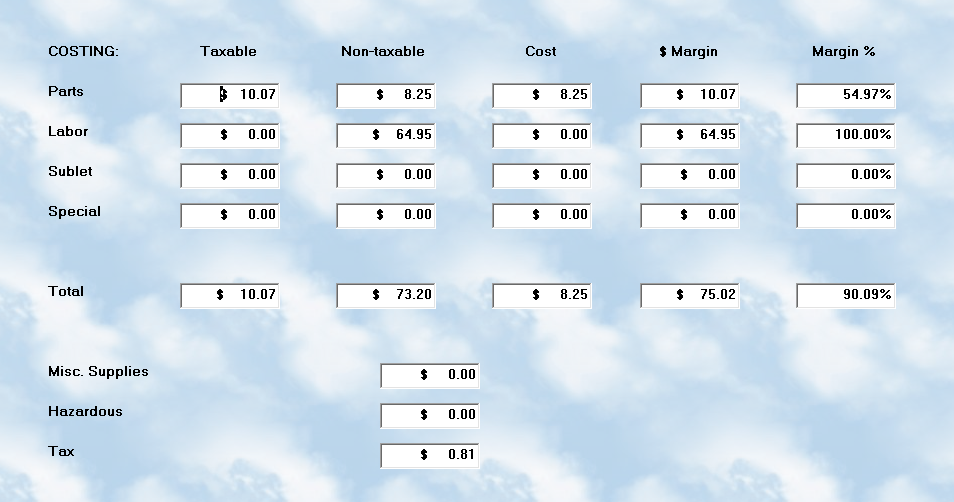
The Job Costing screen separates information into the following categories:
•Parts
•Labor
•Sublet
•Special Charges
Each category is divided into:
•Taxable sales
•Non-taxable sales
•Cost
•Gross Margin Dollars
•Margin Percentage
A running Total line combines all categories to provide the overall profitability of the workorder.
Taxable / Non-Taxable Columns
These columns display the amount charged to the client for:
•Taxable items
•Non-taxable items
The separation is important because:
•Some states tax labor
•Some only tax parts
•Some items are specifically exempt
The totals shown here are based directly on:
•Workorder tax settings
•Inventory tax flags
•Labor tax flags
•Client tax status
Cost Column
The Cost column reflects your actual expense for:
•Inventory parts
•Technician labor
•Sublet services
•Special charges
Parts costs are generally obtained from:
•Average inventory cost
•Non-stocking purchase cost
Labor costs are calculated from:
•Technician costing setup
•Flat rate units
•Actual time
•Hourly burden rates
Sublet costs are typically:
•Vendor invoice amounts
•Outside contractor charges
Margin Dollars
The Margin column displays:
•The actual dollar profit earned
The calculation is:
Sale Price minus Cost
This allows you to immediately see:
•Which jobs are profitable
•Which services may be underpriced
•Whether discounts are negatively affecting revenue
Margin Percentage
The Margin % column displays:
•The percentage of profit relative to the sale amount
This provides a quick visual measurement of:
•Parts profitability
•Labor profitability
•Overall job performance
Example:
•A $100 sale with a $40 cost results in a 60% gross margin
Higher percentages generally indicate:
•Better profitability
•Proper pricing structure
•Effective labor management
Miscellaneous Shop Supplies
The lower section of the screen displays:
•Miscellaneous Shop Supplies
•Hazardous Waste charges
•Sales Tax
These values are shown separately because:
•They are not considered direct profit categories
•Some are pass-through fees
•Tax is not business income
Real-Time Analysis
The Job Costing screen updates dynamically while the workorder is being developed.
This allows service advisors and managers to:
•Review profitability before closing the workorder
•Adjust pricing if necessary
•Verify margins meet company standards
•Catch underpriced labor or parts immediately
Technician Cost Tracking
Labor profitability is heavily influenced by:
•Technician pay structure
•Flat rate efficiency
•Actual time used
•Labor pricing levels
Because MLS 2026 supports:
•Flat rate costing
•Actual time costing
the profitability calculations can be extremely accurate.
Best Practices
•Review Job Costing before finalizing major workorders
•Verify labor margins regularly
•Watch for unusually low parts margins
•Be cautious when applying global discounts
•Review sublet profitability carefully
•Train service advisors to understand margin percentages
Consistent review of Job Costing information is one of the best ways to improve:
•Shop profitability
•Pricing consistency
•Labor efficiency
•Overall financial performance