The MLS 2026 inventory system is designed around a complete workflow:
Purchase Orders
↓
Stock Input
↓
Inventory Updates
↓
Workorder Usage
↓
Sales & Reporting
↓
Reordering & Balancing
By following this workflow consistently, MLS 2026 can provide highly accurate:
•inventory valuation
•stock control
•pricing management
•purchasing recommendations
•sales analysis
The Inventory Menu Bar
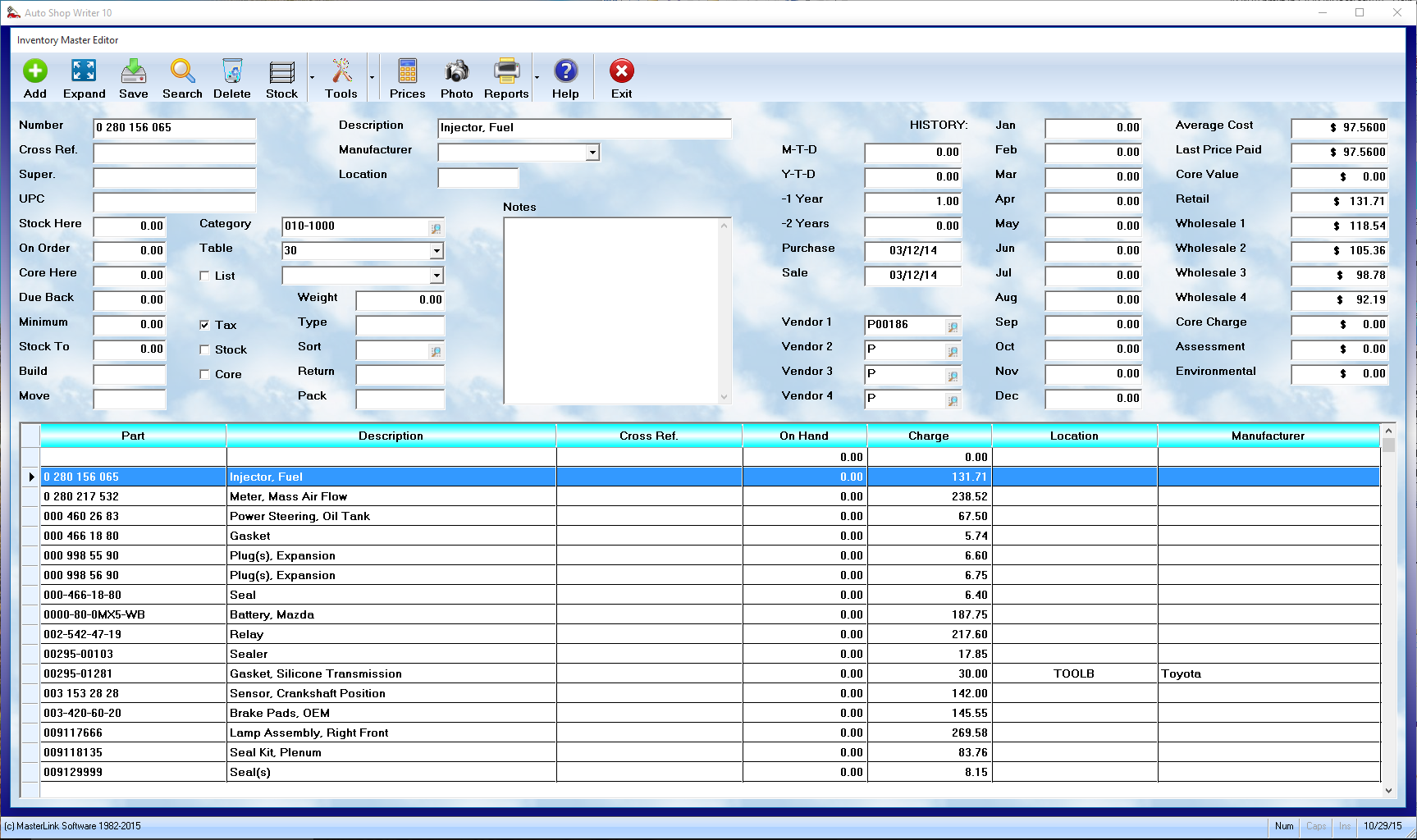
The Inventory Editor provides direct access to all inventory operations from one screen.
 Add
Add
Creates a new inventory record.
Use this option when:
•adding new stocked inventory
•creating non-stocking part records
•entering vendor supplied items
•creating special order records
 Expand
Opens a larger editing window for:
👉 Notes
This is useful for:
•vendor comments
•installation notes
•warranty details
•internal procedures
•special handling instructions
 Save
Save
Saves:
•new records
•edited information
•pricing changes
•quantity updates
•notes modifications
⚠️ Important:
Changes are not retained until:
👉 Save
is selected.
 Search
Allows searching inventory by:
•all inventory items
•stocking parts
•non-stocking parts
•partnumber
•description
•cross reference
Search positioning automatically moves the highlight bar to matching records.
 Delete
Deletes the highlighted inventory record.
⚠️ Important:
Inventory should rarely be deleted because:
•sales history
•pricing history
•vendor information
•inventory statistics
are valuable management tools.
The Stock On Hand quantity must normally be:
👉 0.00
before deletion is permitted.
 Stock
Stock
Provides access to:
•Purchase Orders
•Stock Input
These functions handle:
•ordering inventory
•receiving shipments
•updating quantities
•average cost calculations
•vendor tracking
•accounting integration
 Tools
Tools
Provides access to:
•inventory utilities
•balancing
•pricing management
•vendor changes
•location updates
•yearly closing
•inventory maintenance functions
 Prices
Recalculates pricing using assigned:
👉 Markup Tables
This allows rapid pricing updates across:
•entire inventory
•vendors
•manufacturers
•cost ranges
•pricing groups
 Photo
Photo
Displays pictures associated with the highlighted part.
Photos can help:
•identify unusual items
•reduce ordering mistakes
•improve technician accuracy
•assist inventory management
 Reports
Provides access to:
•inventory listings
•sales summaries
•below minimum reports
•lost sales
•core reports
•stock valuations
•labels
•tracking reports
•purchasing analysis
These reports provide critical management information for:
•purchasing decisions
•inventory valuation
•stock movement
•profitability analysis
Navigation
When the Inventory Editor first opens, you may immediately begin typing:
👉 a partnumber
to reposition the highlight bar within the inventory listing.
Search modes may also be changed using:
👉 Search
allowing searches by:
•description
•cross reference
•stocking status
•partnumber order
and other available search methods.
As records are highlighted in the browse list:
👉 the full inventory information
is displayed in the data fields above.
Initial Inventory Setup Considerations
Before entering inventory into MLS 2026, you should first determine:
👉 what inventory actually exists.
Businesses converting from manual systems often do not have:
•accurate inventory counts
•standardized descriptions
•organized locations
•purchasing history
It is usually best to:
•physically count inventory
•organize shelves
•establish location codes
•standardize descriptions
•identify vendors
•classify stocking vs non-stocking parts
before entering large quantities of data.
Many businesses successfully use:
•temporary personnel
•students
•clerical assistants
to help gather inventory information for initial setup.
Professional technicians and service writers are often more valuable focusing on:
•repair work
•diagnostics
•client service
•production activities
while support personnel assist with inventory collection and data entry.
Why Accurate Inventory Matters
Inventory errors create hidden business losses such as:
•unbilled parts
•duplicate purchases
•overstocking
•dead inventory
•emergency ordering
•pricing errors
•lost sales
•wasted technician time
MLS 2026 provides the management information necessary to:
•identify these problems
•monitor inventory movement
•improve purchasing
•control stocking levels
•maintain accurate pricing
•improve profitability
The more consistently the inventory procedures are followed:
👉 the more accurate and valuable the management information becomes.
Recommended Best Practices
•Use Purchase Orders consistently
•Process all receiving through Stock Input
•Maintain accurate location codes
•Standardize descriptions and manufacturers
•Use Pricing Tables whenever possible
•Reconcile physical inventory regularly
•Monitor Below Minimum reports frequently
•Review slow-moving inventory monthly
•Process returns and cores promptly
•Preserve inventory history whenever possible
•Train employees on inventory workflow procedures
Recommended Companion Sections
The Inventory Overview works closely with:
•Inventory Editor
•Stocking Parts
•Non-Stocking Parts
•Partnumbers & Cross References
•Purchase Orders
•Stock Input
•Returns Processing
•Core Processing
•Inventory Utilities
•Inventory Price Management
•Stock Balancing
•Inventory Reports
Together, these sections provide a complete inventory management system within MLS 2026.