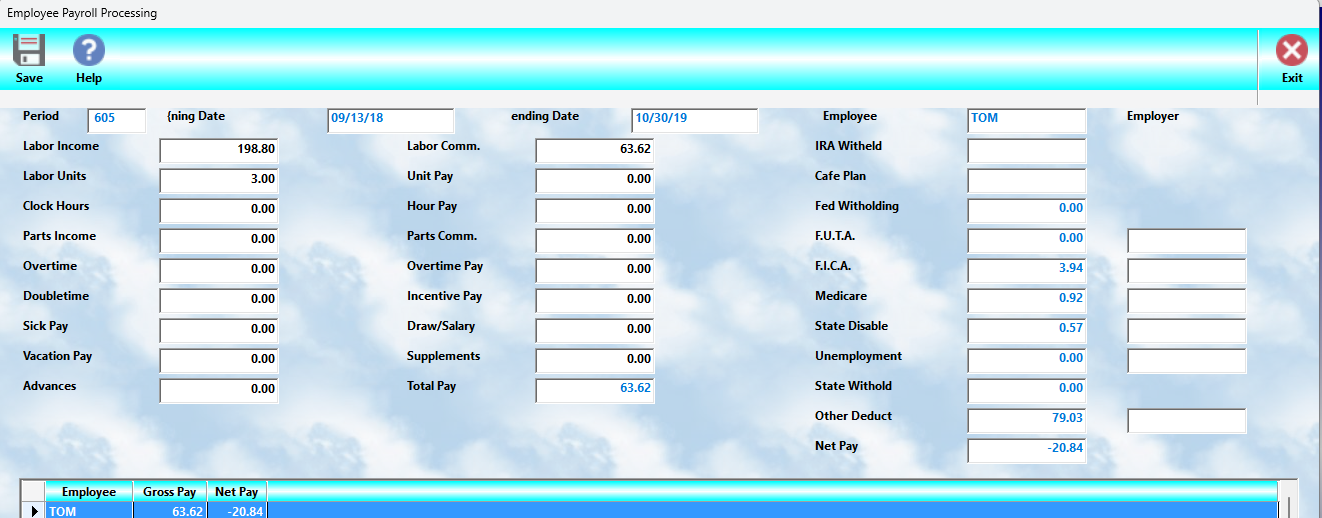
When the:
👉 Gross Pay
option is selected, MLS 2026 begins the automated payroll earnings calculation process.
The system first prompts for the:
•payroll period type
The supported processing periods are:
•Weekly
•Bi-Weekly
•Semi-Monthly
•Monthly
Based on the selected payroll cycle:
👉 the system automatically determines the appropriate dates to be included in processing.
These dates are then displayed for:
•operator review
•verification
•adjustment if necessary
⚠️ Always verify the payroll dates carefully before continuing.
Automatic Gross Pay Calculation
Once the payroll period dates are confirmed:
👉 MLS 2026 automatically calculates Gross Pay
for each employee based on:
•employee classification
•pay methods
•workorders
•commissions
•timeclock activity
•payroll records
•sick and vacation pay
•payroll advances
The system evaluates all available payroll activity and creates:
👉 pending payroll records
for processing.
Hourly Employee Verification
For employees paid by:
•hourly wages
•overtime
•doubletime
the system prompts for:
•regular hours worked
•overtime hours
•doubletime hours
This allows management to:
•confirm time accuracy
•correct missing entries
•adjust manual time records
before payroll is finalized.
Payroll Review Screen
After calculations are completed:
👉 the system displays a browse list
of all employees for whom payroll checks have been prepared.
As each employee is highlighted:
👉 the complete payroll detail
is displayed in the upper section of the screen.
This allows management to:
•review payroll calculations
•verify totals
•inspect earnings
•make corrections if needed
before moving on to tax withholding and final payroll processing.
Important Review Recommendation
⚠️ Carefully review ALL payroll information before continuing.
The system calculates:
•both actual activity totals
and
•resulting pay calculations
based on employee setup and payroll data.
Although fields may be edited:
👉 it is generally recommended that changes be limited to:
•Supplements
unless an actual processing error has occurred.
Why Supplements Are Preferred
The:
👉 Supplements
field is intended for:
•bonuses
•adjustments
•special compensation
•manual additions
Using Supplements avoids:
•altering calculated payroll data
•affecting payroll history incorrectly
•creating inconsistent labor records
Direct modification of calculated payroll values should only occur when:
👉 an actual payroll error must be corrected.
Deduction Display
At this stage:
👉 deduction amounts are NOT yet calculated.
Therefore:
•tax withholding
•payroll deductions
•IRA deductions
•benefit deductions
will generally appear blank or incomplete.
These values are calculated during:
👉 the next payroll processing stage.
Payroll Categories Displayed
The Gross Pay review screen displays the following payroll categories.
Labor Income
👉 The total labor sales
generated by the employee during the payroll period.
This reflects:
•billed labor activity
•technician labor sales
•workorder labor totals
Labor Commission
👉 Commission earned on labor sales
based on the employee commission setup.
Labor Units
👉 Total flat-rate units
charged during the payroll period.
Often referred to as:
•flat rate hours
•service units
Unit Pay
👉 Earnings based on flat-rate compensation
calculated from:
•labor units
•flat-rate pay setup
Clock Hours
👉 Actual hours worked
based on:
•timeclock records
•manual time entries
Hour Pay
👉 Earnings generated from hourly wages
including:
•regular hourly pay
•time-based compensation
Parts Income
👉 Total parts sales
attributed to the employee through workorders.
Parts Commission
👉 Commission earned from parts sales
based on the employee commission setup.
Overtime
👉 Total overtime hours worked
during the payroll period.
Overtime Pay
👉 Additional compensation
earned from:
•overtime
•doubletime calculations
Doubletime
👉 Total doubletime hours worked
during the payroll period.
Incentive Pay
👉 Additional compensation
earned from:
•incentive scales
•productivity bonus structures
•flat-rate performance levels
Sick Pay
👉 Sick leave compensation
scheduled for this payroll period.
Draw / Salary
👉 Salary or draw earnings
for the payroll cycle.
Vacation Pay
👉 Vacation compensation
to be included on the payroll check.
Supplements
👉 Additional manual compensation
such as:
•bonuses
•special adjustments
•temporary additions
Advances
👉 Employee advances
previously issued against payroll.
⚠️ These amounts are deducted from:
•NET pay
during final payroll processing.
IRA Withheld
👉 IRA withholding amounts
scheduled for deduction from the employee paycheck.
Final Payroll Reminder
⚠️ Payroll review is one of the most important steps in payroll processing.
Always verify:
•hours
•commissions
•overtime
•supplements
•advances
•vacation and sick pay
before continuing to:
👉 deduction and payroll check processing.
Correcting payroll before checks are issued is always much easier than:
•payroll reversals
•tax corrections
•accounting adjustments
•employee disputes
Recommended Best Practices
When reviewing Gross Pay:
•Verify payroll dates carefully
•Review employee hours
•Confirm overtime calculations
•Review commissions and incentives
•Check supplements and advances
•Compare totals to prior payroll periods
•Review unusual payroll fluctuations
•Use Supplements for manual additions whenever possible
Recommended Companion Sections
This section works closely with:
•Employee Pay Methods
•Sick and Vacation Pay
•Payroll Advances
•Payroll Tax Setup
•Payroll Processing
•Payroll Reports
•Payroll Troubleshooting
Together, these sections provide a complete employee payroll calculation and review workflow within MLS 2026.