The purpose of marketing is not:
👉 sending messages to everyone.
The purpose is:
👉 communicating with the right people at the right time with the right message.
After reviewing the Analysis tools, you will have a much clearer understanding of:
•who your best clients are
•where they are located
•what services they purchase
•how frequently they return
•what opportunities exist for follow-up communication
These groups become your:
👉 target audience.
MLS 2026 includes a powerful Targeted Marketing system designed specifically to help you communicate efficiently with selected groups of clients and service units.
Why Targeted Marketing Matters
General advertising is expensive.
Mass communication often reaches:
•people who are not interested
•clients who are outside your market
•individuals unlikely to return
•customers who do not fit your business model
Targeted marketing focuses your efforts on:
•existing clients
•overdue services
•repeat maintenance
•specific service groups
•profitable demographics
•high-retention clients
This dramatically improves:
•efficiency
•response rates
•retention
•return on investment
Accessing The Marketing System
Select the:
👉 Marketing tab
from the Client screen.
The system allows you to:
•select groups of clients
•define detailed selection criteria
•create communication campaigns
•output multiple formats
•save postage by combining email and printed methods
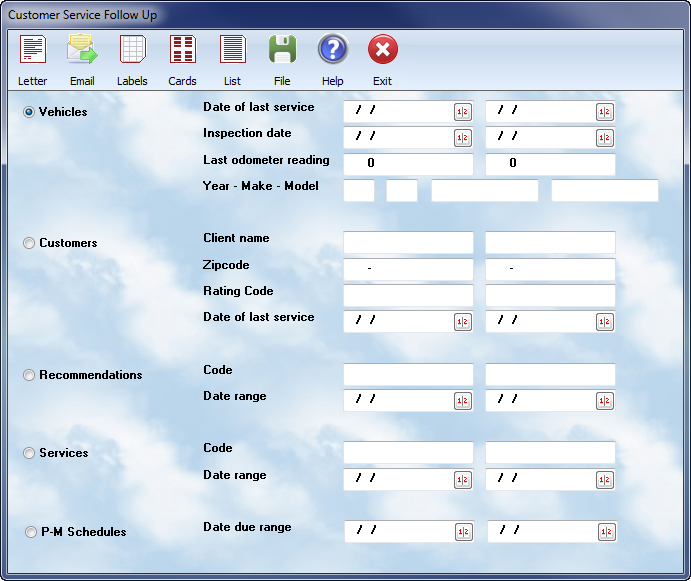
Insert screenshots of:
•Marketing tab
•Selection criteria screen
•Output options
•Selection categories
Flexible Selection Criteria
The selection system is designed to be:
•flexible
•powerful
•easy to use
You may use:
•one criterion
•several criteria
•or highly detailed combinations
The system only uses:
👉 fields where information is entered.
Any blank field is ignored.
This makes it possible to create:
•very broad selections
or
•highly targeted lists
without unnecessary complexity.
Date Range Logic
Most date fields use:
•beginning dates
•ending dates
•or both
You are not required to fill in both values.
Examples:
Beginning Date Only
Entering:
•01/01/2026
means:
👉 all records on or after that date.
Ending Date Only
Entering:
•01/01/2026
in the ending field means:
👉 all records on or before that date.
Both Dates
Entering:
•beginning and ending dates
limits the selection to:
👉 only records within that range.
This flexible structure allows for:
•overdue reminders
•seasonal marketing
•inspection follow-ups
•return visit campaigns
•service interval notifications
Marketing Output Options
MLS 2026 supports multiple communication formats.
You may generate:
•letters
•postcards
•mailing labels
•emails
•printed listings
•merge files for external programs
Multiple outputs may be generated from the same selection without re-entering the criteria.
For example:
•generate emails first
•then print letters for clients without email addresses
•then print labels
•then create a hard-copy listing
all from the same selection group.
This improves efficiency and reduces repetitive work.
Mixed Email And Printed Campaigns
One especially useful feature is:
👉 automatic email filtering.
You may:
1.send emails to clients with valid email addresses
2.then print letters only for clients without email access
This:
•reduces postage expense
•improves efficiency
•ensures wider communication coverage
without duplicate contact efforts.
Major Selection Categories
The Marketing system is divided into five major categories:
1.Service Unit Selection
2.Client Selection
3.Previous Recommendations
4.Type Of Service Performed
5.Preventative Maintenance Due
Each category is selected using its own:
👉 radio button selection area.
Insert screenshot of:
•radio button selection sections
Selecting By Service Unit
This option allows communication based on:
•service history
•inspection dates
•mileage
•unit type
•manufacturer
•service intervals
This is especially useful for:
•maintenance reminders
•inspection notifications
•mileage-based services
•seasonal service recommendations
Date Of Last Service
This selection reviews service units based on:
👉 their most recent service date.
Examples include:
•clients overdue for oil service
•vehicles not serviced recently
•seasonal follow-up campaigns
Examples:
•units serviced between two dates
•units serviced before a cutoff date
•units serviced after a specific period
Date Of Next Inspection
Some service units require:
•annual inspections
•certifications
•periodic safety reviews
•recurring compliance checks
This selection allows follow-up communication based on:
👉 the next inspection due date.
This is especially valuable for:
•fleet services
•regulated equipment
•annual certification programs
Mileage At Last Service
Mileage or hour-based selection is extremely effective for:
•preventative maintenance
•recurring service reminders
•wear-item replacement scheduling
Examples include:
•30,000 mile service reminders
•60,000 mile maintenance campaigns
•equipment hour-based inspections
Selecting By Unit Type
The system may filter by:
•year
•make
•model
•submodel
This is valuable when:
•promoting specialty services
•communicating with owners of specific brands
•targeting known problem areas
•supporting manufacturer-specific expertise
Examples:
•hybrid systems
•diesel services
•transmission specialties
•European imports
•fleet equipment
Selecting By Clients
Sometimes communication should target:
👉 people
rather than
👉 service units.
Client selection allows filtering by:
•client name
•zipcode
•rating code
•demographic grouping
This selection method is often used for:
•newsletters
•seasonal reminders
•business announcements
•community outreach
•promotional events
Newsletters And Educational Marketing
Educational communication is often more effective than:
👉 direct advertising.
Clients respond positively to:
•helpful information
•seasonal advice
•maintenance tips
•safety reminders
•technical expertise
This strengthens:
•trust
•credibility
•professional image
The goal is:
👉 becoming the trusted expert
instead of simply another repair facility.
Name Range Selection
Name filtering uses:
•beginning ranges
•ending ranges
Because spaces and letters sort differently, it is important to:
•fully specify ranges correctly
Examples:
•AAA through CZZ
This ensures:
👉 all matching names are included properly.
Zipcode Selection
Clients may also be selected by zipcode.
This is extremely useful for:
•local mailings
•geographic campaigns
•community promotions
•regional outreach
The system supports:
•5-digit zipcodes
•extended zipcodes
•exact geographic matching
Rating Code Selection
Clients may be grouped using:
👉 rating or classification codes.
Examples might include:
•fleet clients
•luxury clients
•wholesale accounts
•referral groups
•specialty markets
•advertising source tracking
This allows highly focused communication campaigns.
Selecting By Previous Recommendations
This option targets:
👉 previously recommended work
that has not yet been completed.
MLS 2026 automatically tracks recommendation codes placed on workorders.
When completed:
•recommendations are cleared automatically
This system allows follow-up communication for:
•deferred repairs
•safety concerns
•maintenance recommendations
•future services
Only coded recommendations are included.
Free-form notes are not evaluated.
Search Back Date
Because older recommendations may already have been completed elsewhere, the system allows:
👉 a search-back limit.
This helps focus communication on:
•recent opportunities
•active recommendations
•current client needs
rather than outdated information.
Selecting By Type Of Service Performed
This selection method targets:
👉 clients who previously received specific services.
Examples:
•oil services
•transmission services
•timing belt replacement
•brake work
•annual inspections
This is extremely effective for:
•recurring maintenance reminders
•seasonal service campaigns
•service interval follow-up
The system uses:
👉 Labor Glossary codes
for identifying matching services.
Selecting By Preventative Maintenance Due
The Preventative Maintenance Scheduler integrates directly with the Marketing system.
This allows MLS 2026 to automatically identify:
•upcoming services
•projected due dates
•recurring maintenance needs
for every tracked service unit.
This is one of the most powerful automation features in the system.
Automatic PM Follow-Up
The PM system automatically:
•evaluates schedules
•projects future service dates
•generates communication lists
•prepares reminders
This allows businesses to maintain:
👉 regular client contact
with very little manual effort.
The communication feels:
•organized
•professional
•attentive
without requiring daily staff involvement.
Recommended PM Usage
It is strongly recommended that PM campaigns be run:
👉 monthly.
This keeps:
•reminders timely
•schedules current
•communication consistent
Regular preventative maintenance communication improves:
•retention
•repeat business
•service scheduling
•long-term customer relationships
Building Better Client Relationships
The goal of Targeted Marketing is not:
👉 aggressive advertising.
The goal is:
👉 relevant communication.
Clients appreciate:
•reminders
•helpful information
•professionalism
•organization
•attention to detail
Well-timed communication helps clients feel:
•remembered
•valued
•supported
That relationship often matters more than:
•discounts
•coupons
•price competition
Recommended Best Practices
•Focus on small targeted groups
•Use analysis reports before creating campaigns
•Keep communication professional and helpful
•Combine email and printed methods strategically
•Track overdue services regularly
•Use PM scheduling consistently
•Avoid excessive marketing frequency
•Focus on relationship building
•Use educational communication whenever possible
•Evaluate response rates and ROI
Recommended Companion Sections
•Marketing Overview
•Client Analysis
•Understanding Your Client Base
•Creating Text For Communications
•Communication Strategies
•Preventative Maintenance Scheduler
•Service History
•Auto CRM
•Selection Of Records
•Choosing Communication Formats