The Purpose Of Auto CRM
Consistent communication with clients is one of the most effective ways to:
•improve retention
•increase repeat business
•build trust
•encourage preventative maintenance
•strengthen long-term relationships
Unfortunately, many shops become so busy handling daily operations that:
👉 follow-up communication never happens.
MLS 2026 solves this problem with:
👉 Auto CRM.
The Auto CRM system automatically:
•sends follow-up emails
•tracks preventative maintenance reminders
•manages appointment confirmations
•records communication activity
•schedules automated service contact
with very little operator involvement.
Once configured properly:
👉 the system largely runs itself.
How Auto CRM Works
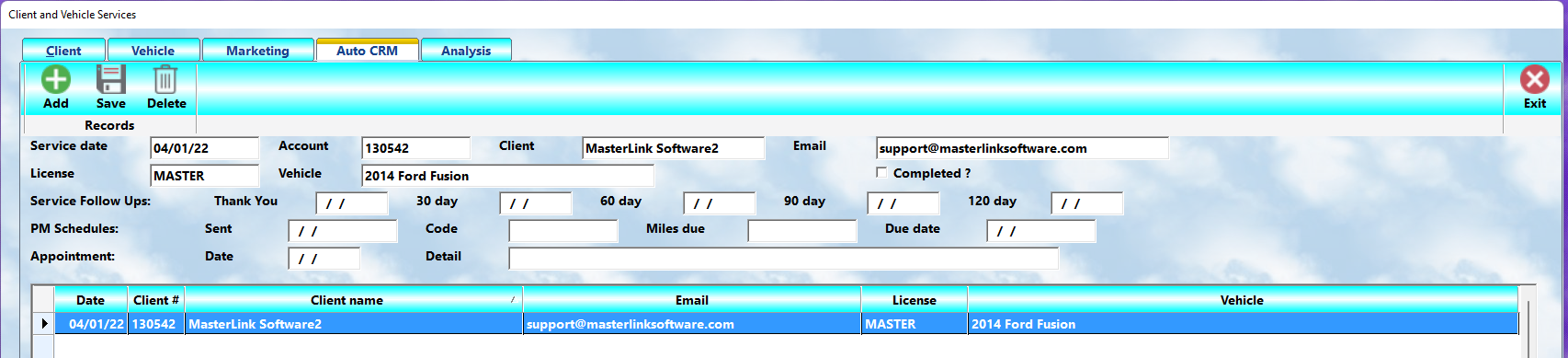
When the Auto CRM system is activated:
•MLS 2026 evaluates activity automatically
•communication records are generated automatically
•emails are sent automatically
•reminders are tracked automatically
The entire process is designed around:
👉 “set it and forget it” automation.
Insert screenshots of:
•Auto CRM setup screen
•Auto CRM activity list
•Service follow-up records
•PM Scheduler reminders
•Appointment reminder entries
Required Setup
For Auto CRM to function correctly:
•the client must have a valid email address
•follow-up messages must be configured
•outbound email services must be activated
•automation must be enabled
Once these items are complete:
👉 communication becomes automatic.
Service Follow-Up Workflow
When a workorder is:
👉 closed
MLS 2026 automatically creates:
•service follow-up records
•PM reminder records (if applicable)
•future communication schedules
The first email is typically sent:
👉 the evening of the completed service.
Additional emails may then be scheduled for:
•30 days
•60 days
•90 days
•120 days
after the original visit.
Each communication uses:
👉 predefined message templates.
Typical Follow-Up Schedule
A common sequence might include:
Day 1 — Thank You
A brief, sincere thank-you message.
30 Day Follow-Up
A friendly reminder to contact the shop if concerns develop.
60 Day Follow-Up
Helpful tips or seasonal service reminders.
90 Day Follow-Up
A preventative maintenance reminder.
120 Day Follow-Up
A reminder that service may now be overdue.
This ongoing communication helps keep:
👉 your business in front of the client
without aggressive sales tactics.
Creating Follow-Up Messages
All email text is created in the:
👉 Text Editor
within the Marketing system.
When creating automated email templates:
•set the Type field to:
👉 E (Email)
Templates should be:
•brief
•sincere
•professional
•conversational
•easy to read
Long marketing emails are usually ignored.
Short helpful messages receive far better engagement.
Recommended Message Strategy
Thank You Email
The first message should:
•thank the client sincerely
•confirm appreciation for their business
•reinforce professionalism
30 & 60 Day Messages
These messages should:
•remain helpful
•encourage communication
•reinforce trust
•offer maintenance awareness
Examples:
•seasonal tips
•tire reminders
•fluid checks
•inspection awareness
90 Day Reminder
This message should:
•encourage preventative maintenance
•remind the client service may soon be due
120 Day Reminder
This communication may:
•indicate service could now be overdue
•encourage scheduling an appointment
Activating The System
Once message templates are created:
1.Open Auto CRM Setup
2.Enable the automation checkbox
3.Select the outbound email method
4.Assign templates to each interval
5.Save the configuration
After setup:
👉 no additional daily processing is normally required.
Email Delivery Methods
MLS 2026 supports multiple outbound delivery methods depending on:
•system configuration
•provider support
•operating environment
Examples may include:
•SMTP mail services
•Windows email integration
•supported external providers
Your specific configuration depends on:
•your environment
•internet connectivity
•external provider setup
The Auto CRM Activity Screen
All pending and completed communications are displayed in:
👉 the Auto CRM Activity screen.
This allows operators to:
•review activity
•confirm communications
•edit records
•add manual entries
•stop future communication
•monitor pending reminders
The display includes:
•client information
•email addresses
•service details
•appointment reminders
•PM schedule notifications
•communication status
Managing Opt-Out Requests
Some clients may request:
👉 no further email communication.
When this occurs:
•check the Completed field
•save the record
No further emails will be sent for that activity sequence.
This allows shops to respect:
•client preferences
•communication boundaries
•privacy requests
while still retaining operational records.
Service Follow-Up Tracking
The Auto CRM display shows:
•which emails were sent
•when they were sent
•pending future communications
•completed sequences
Once all scheduled emails are delivered:
👉 the record is automatically marked complete.
This gives management a clear overview of:
•ongoing communication
•pending activity
•campaign status
PM Scheduler Integration
The Preventative Maintenance Scheduler integrates directly with Auto CRM.
When a tracked PM service approaches:
•the system calculates projected due dates
•evaluates mileage or usage patterns
•creates reminder records automatically
The PM reminder includes:
•service description
•projected due mileage
•projected due date
•recommended maintenance information
This creates:
👉 highly personalized maintenance communication.
Appointment Confirmation Integration
Appointment reminders may also be generated automatically.
When appointments are created and confirmed:
•reminder records may be added
•automated notifications may be sent
•future scheduling communication may occur
Appointment reminders help:
•reduce missed appointments
•improve scheduling efficiency
•reinforce professionalism
Built-In PM And Appointment Text
Unlike service follow-up templates:
•PM reminders
•appointment confirmations
use:
👉 built-in system messaging.
These automatically include:
•appointment details
•service descriptions
•projected maintenance information
•scheduling information
without requiring manual template creation.
Why Auto CRM Matters
Most businesses lose clients because:
👉 communication stops.
Clients:
•forget service intervals
•delay maintenance
•become distracted
•lose connection with the business
Consistent communication:
•keeps your business visible
•reinforces trust
•encourages retention
•increases repeat visits
without requiring daily staff effort.
Automation Without Complexity
One of the strengths of Auto CRM is:
👉 simplicity.
After initial setup:
•communications generate automatically
•records update automatically
•PM schedules evaluate automatically
•reminders process automatically
This allows even small shops to maintain:
👉 professional client communication systems
without hiring dedicated marketing staff.
Best Communication Philosophy
The most effective CRM communication:
•sounds personal
•feels sincere
•provides useful information
•avoids excessive advertising
•respects the client’s time
Clients appreciate:
•reminders
•professionalism
•helpful advice
•thoughtful follow-up
They dislike:
•spam
•aggressive sales messaging
•constant promotions
The goal is:
👉 relationship building
rather than repetitive advertising.
Recommended Best Practices
•Keep emails brief and professional
•Use conversational language
•Avoid excessive sales messaging
•Review templates periodically
•Update seasonal content regularly
•Maintain accurate client email addresses
•Use PM scheduling consistently
•Respect opt-out requests immediately
•Test outbound email configuration carefully
•Monitor communication activity regularly
Recommended Companion Sections
•Marketing Overview
•Creating Text
•Communication Strategies
•Targeted Marketing
•Choosing A Communication Format
•Preventative Maintenance Scheduler
•Client Analysis
•Service History
•Appointment Scheduling
•Understanding Your Client Base